SlidesAI Review 2026: Fast AI Presentations for Google Slides, With Strings Attached
SlidesAI turns text into Google Slides presentations in seconds. But design quality is inconsistent, free-tier limits are tight, and polish still requires real effort.
Slides AI
Slides AI
slidesai.ioSlidesAI turns text into Google Slides presentations in seconds. But design quality is inconsistent, free-tier limits are tight, and polish still requires real effort.
Quick facts
- Free plan
- Yes, 12 presentations/year
- Native integration
- Google Slides + PowerPoint add-in
- Languages supported
- 100+
- Document upload
- Pro and Premium plans only
- ChatGPT integration
- Yes, custom SlidesAI GPT
- Export format
- PPTX (native Google Slides + PowerPoint)
- Payment processor
- Paddle
Key features
Text-to-Slides Generation
Enter a topic or paste notes and the AI builds a structured slide deck in seconds.
Native Google Slides & PowerPoint Add-in
Installs directly into your existing tools, no new platform, no export step.
In-Editor Content Refinement
Rephrase, shorten, adjust tone, and translate content slide-by-slide from a sidebar panel.
150+ Templates
Built-in professional templates that you can apply and customize after generation.
AI Image Generation
Generate or insert quality stock images without leaving the editor.
SlidesAI GPT
A custom ChatGPT integration that saves finished decks directly to Google Slides.
100+ Language Support
Generate and translate presentations across major world languages.
Document Upload (Paid)
Feed in PDFs and docs as source material on Pro and Premium plans.
Pros
- Works natively inside Google Slides and PowerPoint, no platform switching or format conversion required.
- Generation is genuinely fast, producing multi-slide decks in under a minute from a text prompt.
- The free tier is real and functional for occasional users.
- In-editor refinement tools (rephrase, shorten, translate) are well-placed and save meaningful time.
- 100+ language support makes it practical for international teams.
Cons
- Design output is generic and inconsistent, external-facing presentations will need significant manual polish.
- Free tier's 2,500-character input cap is too tight for most real-world source material.
- Annual AI credit limits restrict image generation and translation on lower plans.
- Generation reliability issues (fewer slides than expected, overlapping elements) appear across multiple independent tests.
- No publicly listed pricing for Team and Institution tiers, making budget planning harder for organizations.
See Slides AI for yourself
Free to start, no credit card needed for the trial.
Screenshots
Ready to try Slides AI?
Skip the screenshots and explore it live.
What SlidesAI Actually Does
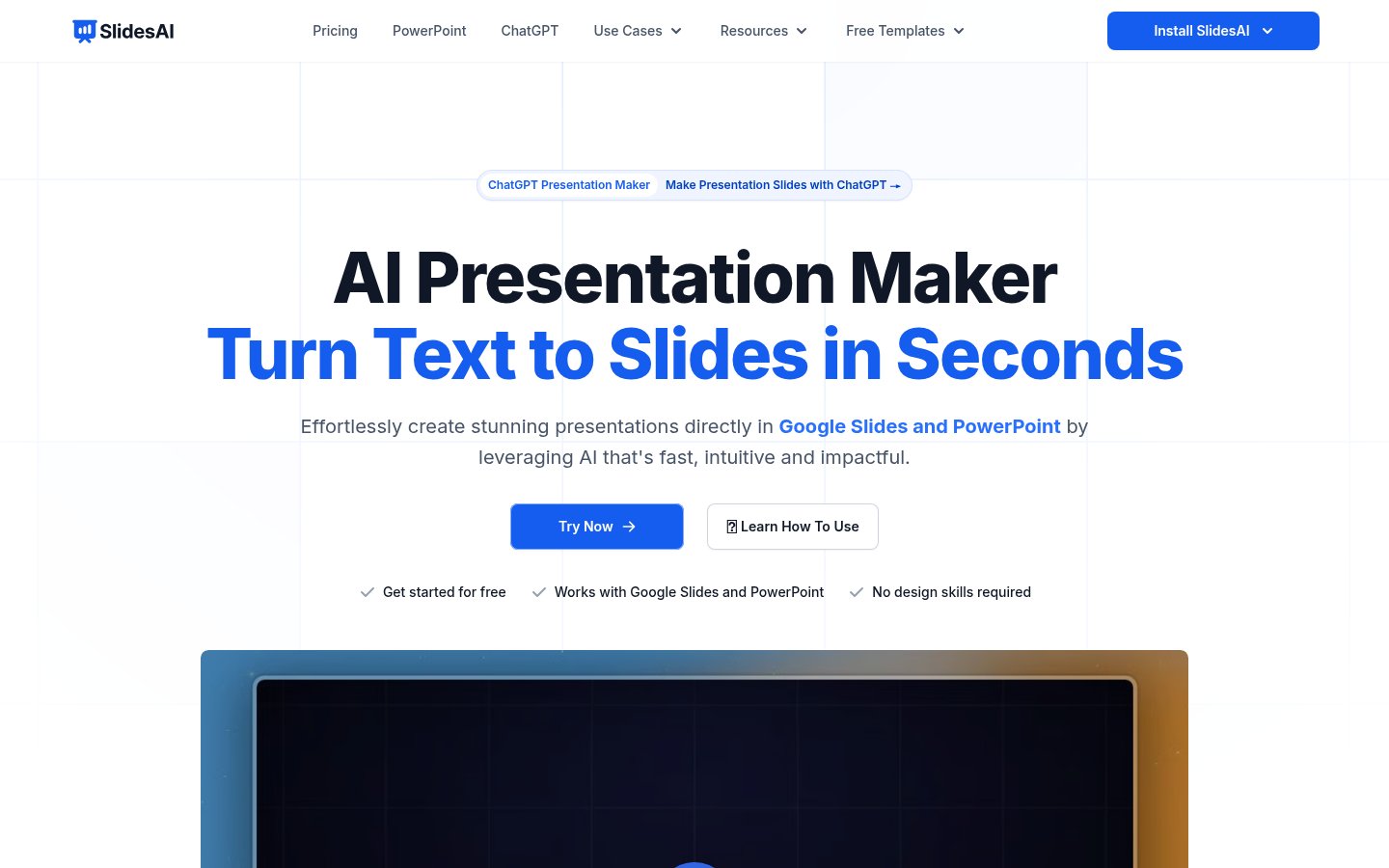
SlidesAI is an AI-powered presentation generator that lives inside Google Slides and PowerPoint. You give it a text prompt or paste in your notes, it churns out a structured slide deck in seconds. No new platform to learn, no separate web app to log into after the fact, the slides land right where you already work.
That integration pitch is genuinely its best feature. Most AI presentation tools force you into a proprietary editor, then make you export and pray the formatting survives. Gamma is the clearest example, beautiful output, but it's all trapped in Gamma's own environment until you export. SlidesAI skips that friction entirely by installing as a Google Slides extension or a PowerPoint add-in and writing slides directly into your native file.
The tool also supports over 100 languages, which matters more than the marketing makes it sound. Teams working across regions often get burned by AI tools that handle English well and everything else awkwardly. SlidesAI at least acknowledges that the world doesn't only present in English.
How It Works in Practice
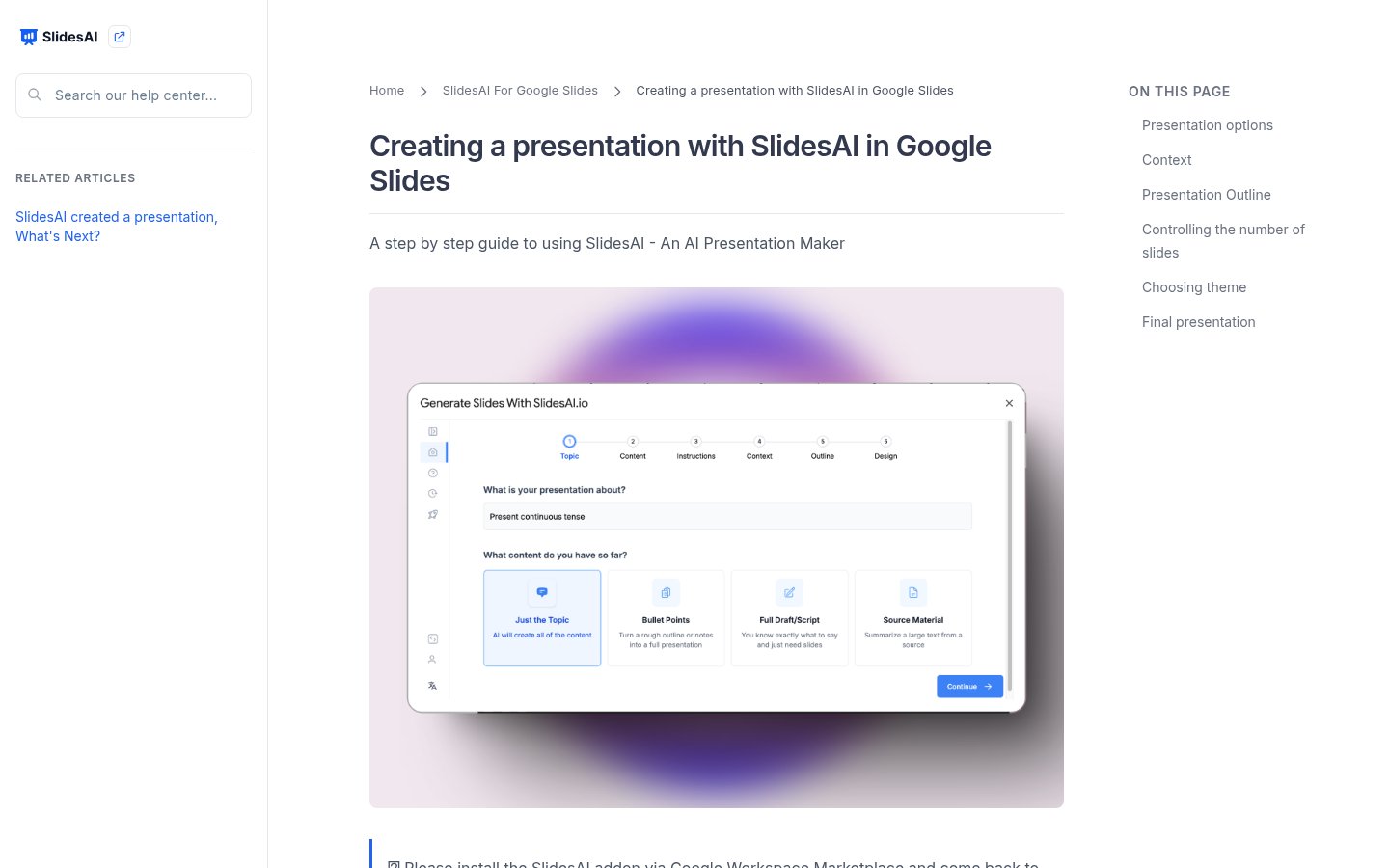
The workflow is simple enough that you don't need a tutorial, but the official site does provide one. You install the extension or add-in, open a new presentation, enter your topic or paste raw notes, pick a tone and template, and let the AI structure and write your slides. After generation, you can rephrase, shorten, or translate content directly from the sidebar panel without leaving the editor.
In independent testing across multiple review sources, the generation speed is genuinely fast. A 26-slide deck from a brief prompt is achievable in under a minute. The AI handles outlining well, it breaks content into logical sections, writes reasonable bullet points, and picks section headers that actually make sense. That's not nothing. Plenty of tools in this space generate slides that read like they were written by a committee that never met.
Where things get messier is design. The output is described consistently across reviewers as "generic" and "inconsistent." One reviewer testing with a 10-slide content marketing prompt got only 4 slides back, with overlapping visual elements. Another noted that AI-generated images are relevant but predictable. The themes are functional rather than impressive, fine for an internal team meeting, less fine for a pitch to people you're trying to impress.
The sidebar panel for refinement is a real UX win. Being able to rephrase a bullet point or shorten a paragraph without leaving the slide is the kind of workflow detail that saves five minutes you didn't know you were wasting. The translate function is similarly well-placed: you can localize a deck without copying content into a separate tool.
One clunky moment: the character input limits on lower tiers mean that if you paste in lengthy source material, the tool will cut you off before it's fully processed your content. That forces you to either truncate your input or upgrade, which feels like an artificial constraint designed around plan differentiation rather than any real technical limitation.
Pricing Breakdown
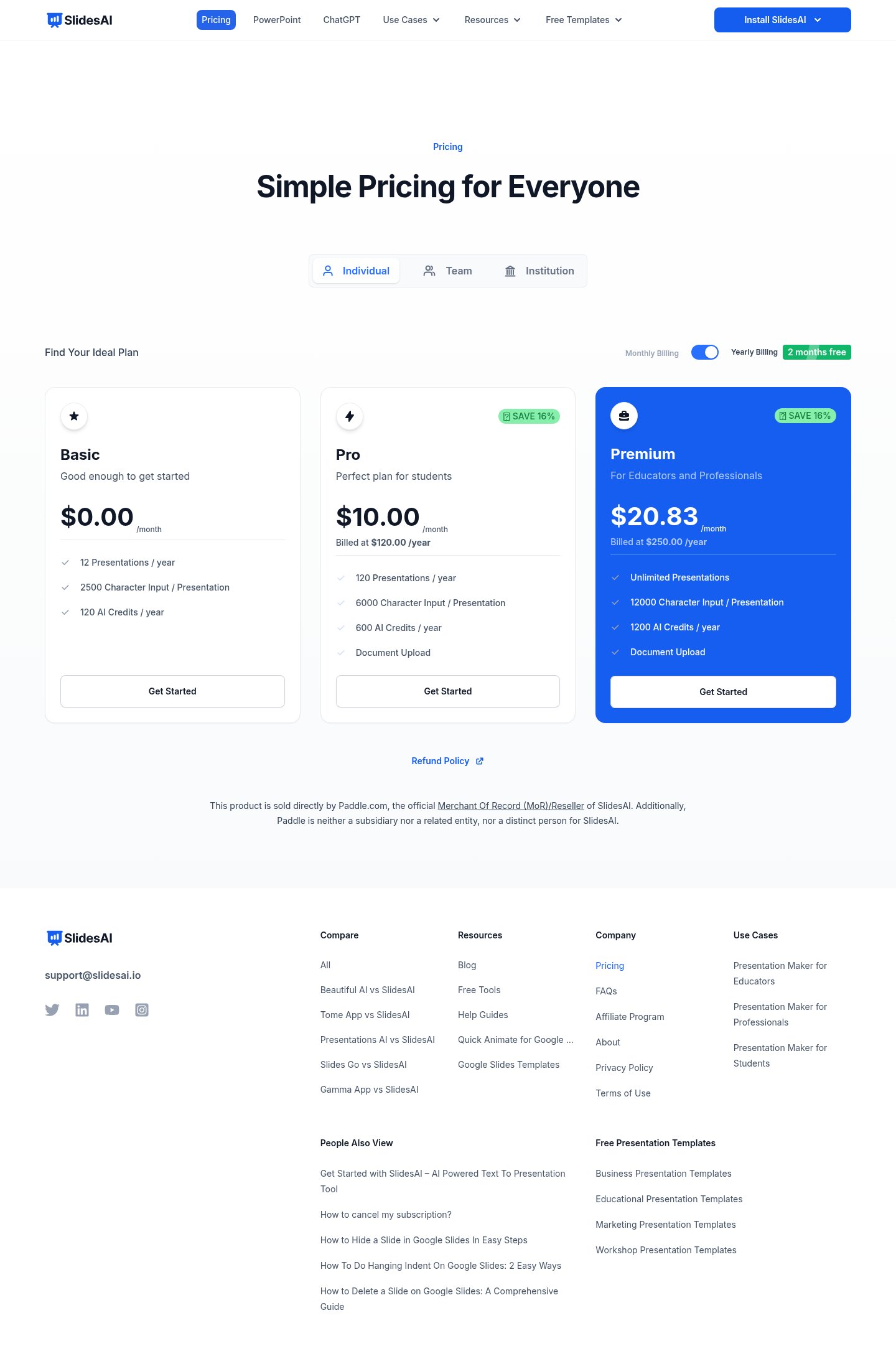
SlidesAI uses a tiered individual pricing model billed annually. There's also Team and Institution pricing, though the site doesn't publish those rates publicly.
| Plan | Price | Presentations/Year | Character Input | AI Credits/Year | Extras |
|---|---|---|---|---|---|
| Basic | $0/mo | 12 | 2,500/presentation | 120 | , |
| Pro | $10/mo (billed $120/yr) | 120 | 6,000/presentation | 600 | Document upload |
| Premium | $20.83/mo (billed $250/yr) | Unlimited | 12,000/presentation | 1,200 | Document upload |
The free Basic tier is real, you can actually generate presentations without a credit card. But 12 presentations per year works out to one per month, which is fine for occasional users and genuinely limiting for anyone who presents regularly. The 2,500-character input cap is the more annoying constraint: it's tight enough that a moderately detailed briefing doc will hit the ceiling.
Pro at $10/month (annual) is the reasonable entry point for students or regular users. The 120 presentations per year and 6,000-character limit are workable for most individual use cases. Document upload at this tier is useful if you're generating decks from existing reports or meeting notes.
Premium at $20.83/month gives you unlimited presentations and the highest input ceiling. For educators who build new slide decks constantly, or professionals who present weekly, that unlimited count matters. The per-month price is competitive with tools like Gamma but you're getting noticeably less design sophistication in exchange for the native-integration convenience.
One thing worth knowing: SlidesAI processes payments through Paddle, which is standard for SaaS products but means any billing issues go through a third party. That's worth factoring in if your organization has procurement restrictions.
Standout Features Worth Examining
Native integration with Google Slides and PowerPoint. This is the feature that makes SlidesAI worth considering at all. The AI presentation tool market is crowded, and most competitors require you to work in their proprietary environment. SlidesAI's extension model means your slides are real Google Slides files from the moment of creation, no export step, no format conversion, no compatibility risk. If your organization has established slide templates or brand guidelines, you can apply them directly rather than fighting an import process. This is exactly the use case where Plus AI also competes, and the two are the main options if you refuse to leave your native environment.
SlidesAI GPT integration. The tool has a custom ChatGPT integration that lets you build presentations from within the ChatGPT interface, with the finished deck saved directly to Google Slides. This is a genuinely interesting workflow for users who already do their thinking inside ChatGPT, you brainstorm, refine your structure in the conversation, then fire it to Slides without switching contexts. It's worth noting that the AI context problem applies directly here: the richer the context you give the GPT, the better the output structure you'll get. Sparse prompts produce sparse decks.
In-editor content refinement. The sidebar lets you rephrase, shorten, adjust tone, and translate content slide-by-slide without leaving the presentation. Most generation tools treat their AI as a one-shot mechanism, generate, then edit manually. SlidesAI's iterative refinement model is more useful, even if the controls are simpler than what you'd find in a dedicated editor. The translate function, which works across 100+ languages, is the most practically useful piece of this for teams that work internationally.
Limitations and Edge Cases
Design quality is the persistent weak point. Across independent reviews, the word that comes up most often is "generic." The 150+ templates help, but they're not going to save you if the underlying AI image choices are predictable and the layouts are visually flat. If you're presenting to clients, investors, or anyone who will judge your credibility partly on slide aesthetics, SlidesAI output will need significant manual polish before it's ready.
The AI credit system adds another constraint layer that isn't always obvious from the plan descriptions. Credits govern specific AI actions (image generation, rephrasing, translation) beyond basic slide generation. Once you burn through your annual credit allocation, those features stop working until renewal. This matters more on the Basic tier, 120 AI credits per year is roughly 2 credits per week, which disappears fast if you're regularly using the image generation or translation features.
There are also generation reliability issues reported in testing. Getting fewer slides than expected, or slides with overlapping content elements, isn't a rare edge case. It shows up across multiple independent reviews. The tool works well enough for drafts, but treating its output as final without review is asking for trouble. If you're dealing with the AI consistency problem in other tools, SlidesAI is no exception.
The character input limits feel artificially constrained. 2,500 characters on the free plan is about 400 words, not enough for most real-world source material. Even the Premium plan's 12,000-character ceiling will cut off longer documents. If you work from detailed briefs, research notes, or lengthy reports, you'll be pre-editing your input before you can even start generating, which partially defeats the point.
Who Should Use It
SlidesAI is built for people who need to produce presentations quickly and already live in Google Slides or PowerPoint. Teachers building new lesson decks regularly, students grinding through academic presentations, and internal-facing business professionals who need functional slides without spending hours on formatting. These are the natural fits. The low barrier to entry (free tier, no new platform to learn) makes it genuinely accessible for people who don't want to invest time in learning a more sophisticated tool.
The AI skill plateau problem is real with SlidesAI: if you lean on it for every presentation without developing your own structural thinking, you'll get faster but not better. Use it as a starting scaffold, then edit aggressively.
If you're presenting to external audiences where design quality signals credibility, SlidesAI isn't the right choice as a one-stop solution. Consultants, agencies, and sales teams pitching high-stakes deals need output that doesn't look auto-generated. For that audience, Plus AI with your own branded template, or Gamma with its more sophisticated design engine, will serve you better. Similarly, if you're already invested in a design-first tool like Beautiful.ai or Visme, SlidesAI doesn't offer enough design differentiation to justify switching.
The 14 million downloads the site claims suggests there's genuine adoption here, particularly among educators and students who need volume over polish. That's a legitimate use case, and for that audience, SlidesAI is among the most practical options available.
Verdict
SlidesAI is the most practical choice if you need AI-generated presentations that stay inside Google Slides or PowerPoint without any export gymnastics. The trade-off is real: design quality is inconsistent, credit limits are restrictive on lower tiers, and the output reliably needs editing before it's client-ready. It earns its place as a drafting tool, not a finished-product generator.
Try Slides AIAlternatives
- GammaRead review →
Better design quality if you don't need native Google Slides output
- Plus AI
Stronger choice for brand-consistent, client-facing decks inside Google Slides or PowerPoint
- GenPPTRead review →
Faster generation with fewer platform restrictions
- Beautiful.ai
Better for design-forward presentations that need to impress external audiences
- Visme
More versatile for teams that need presentations plus other visual content
Frequently Asked Questions
Tools & Services Mentioned
How we made this review
- We went through Slides AI's public website, pricing page and documentation, last checked on June 19, 2026, plus public user discussion where we found it.
- The 3 screenshots above were captured from the live site by our own tooling.
- We did not buy a paid plan for this review. Anything about day-to-day use comes from the vendor or from users, and the text says so where it matters.
- The draft was written with AI assistance under our editorial rules.

Founder and editor of infobro.ai
We research every tool from its documentation, pricing pages, product screenshots and public developer discussion, and say plainly what the evidence does and does not show. Drafts are written with AI assistance under our editorial rules, and we revisit articles to reflect platform changes. Learn more about our process.