Free AI Text to Speech With No Sign-Up: Where 'No Limit' Ends
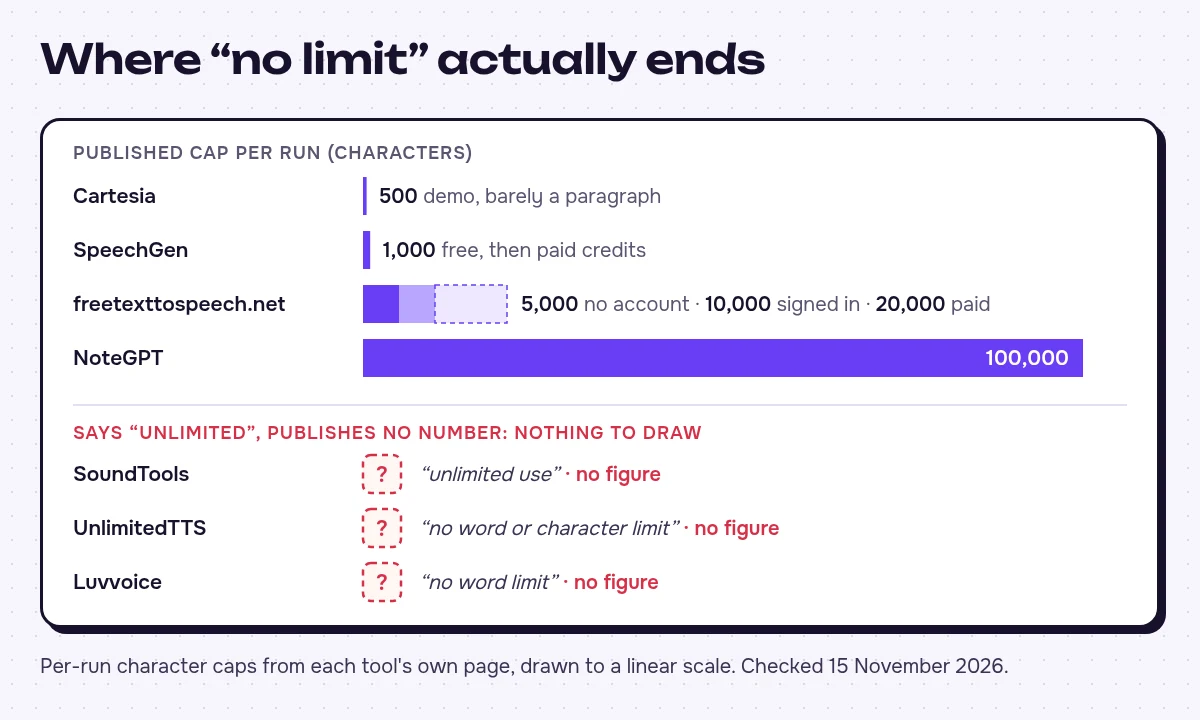
The 'no limit' text-to-speech sites still have caps, just below the headline: 500 characters at Cartesia, 1,000 at SpeechGen, 5,000 at freetexttospeech.net and a 100,000-character box at NoteGPT. Here's what each of ten tools lets you do without an account, and which one to pick for your text length.
 Stanislav VovchykNov 16, 202612 min read
On this page · 10 sections
- 1. The caps behind the "no limit" headlines
- 2. Who each tool suits, and who it doesn't
- 3. Free to hear versus free to keep
- 4. Convert text to speech in four steps
- 5. Long articles and books
- 6. Privacy, and the fallback with no AI at all
- 7. Commercial use, tool by tool
- 8. When a free account is the better deal
- 9. Quick picks by use case
- 10. FAQ
In short
- Every no-sign-up text-to-speech site that publishes a number has a cap: Cartesia stops at 500 characters, SpeechGen at 1,000, freetexttospeech.net at 5,000 and NoteGPT at 100,000.
- For an MP3 or WAV file without an account, freetexttospeech.net is the only one of the ten that clearly promises a download.
- For private, near-unlimited use, pick on-device options like SoundTools, UnlimitedTTS or your operating system's built-in read-aloud, and keep sensitive text out of anonymous web boxes.
- None of the ten states commercial-use terms, so for monetised work use an account plan with readable terms, such as ElevenLabs Starter at $6 a month.
Every ranking text-to-speech site that puts a number on its free tier has a cap. The number just sits below the "no limit" headline. Cartesia's demo stops at 500 characters. SpeechGen gives you 1,000 before you buy credits. freetexttospeech.net allows 5,000 per generation without an account, and NoteGPT's text box holds 100,000. The closest you'll get to no limit is a tool that does the work on your own device. SoundTools runs in the browser, UnlimitedTTS can read with your device's voices, and freetexttospeech.net has an on-device mode. If you need an MP3 or WAV file today without an account, freetexttospeech.net is the only page that promises one.
The caps behind the "no limit" headlines
Limits checked on 15 November 2026.
| Tool | Sign-up needed | Per-generation cap | Daily or monthly cap | Languages | Download | Watermark | Commercial use on the generator page |
|---|---|---|---|---|---|---|---|
| Cartesia | No | 500-character demo | Not stated | Not stated | Plays in browser | Not stated | Not stated |
| SpeechGen | No, for the free sample | 1,000 characters free, then paid credits | Not stated; pay per use after the sample | Not stated | Not stated | Not stated | Not stated |
| freetexttospeech.net | No (an account raises the cap) | 5,000 without account; 10,000 signed in; 20,000 paid | Not stated | Not stated | MP3, WAV | Not stated | Not stated |
| NoteGPT | No | 100,000-character box | Not stated ("no limits" claimed) | Any language you type | Not stated | Not stated | Not stated |
| SoundTools | No | Not stated ("unlimited use" claimed) | Not stated | Not stated | Not stated | Not stated | Not stated |
| UnlimitedTTS | Not stated | Not stated ("no word or character limit" claimed) | Not stated | Not stated | Not stated | Not stated | Not stated |
| Luvvoice | Not stated | Not stated ("no word limit" claimed) | Not stated | 70 | Not stated | Not stated | Not stated |
| SnipSound | No | Not stated | Not stated | 18 | Not stated | Not stated | Not stated |
| Narakeet | No, to try | Not stated | Not stated | Not stated | Not stated | Not stated | Not stated |
| FineVoice | Not stated | Not stated | Not stated | Not stated | Not stated | Not stated | Not stated |
Two patterns stand out. First, the sites that shout loudest about no limit (SoundTools, UnlimitedTTS, Luvvoice) put no figure behind it. NoteGPT is the only one that pairs a "no limits" claim with a stated box size. Second, freetexttospeech.net's tiers show what "no sign-up" is for. The anonymous allowance works as a sample, and every step up (signing in, then paying) doubles it.
I left voice counts out of the table on purpose. A list of 200 voices tells you about language coverage. It tells you nothing about how natural any one of them sounds.
Who each tool suits, and who it doesn't
- Cartesia: The free generator is a shop window for Sonic, the real-time model Cartesia sells through its paid API. It's useful if you're auditioning TTS models for an app. With a 500-character demo, it's the wrong pick for anyone producing a narration. That's barely a paragraph.
- SpeechGen: The free tier is a funnel into paid credits. The page pairs "Try Free" with "Pay only for what you use". It suits someone who needs a few short clips and would rather pay per use than subscribe. It's wrong for anyone converting more than a page of text without paying.
- freetexttospeech.net: I'd start here for a downloadable file with no account. It names MP3 and WAV, allows 5,000 characters a run anonymously, says it joins longer text in parts for you, and has an on-device mode. It's less suited to heavy daily use without an account, because the higher caps need a login.
- NoteGPT: The 100,000-character box is the largest single run on this list, so it suits long articles and reports. The page doesn't name a file format or licence terms. Generate a short clip and confirm you can save it before you paste a long document.
- SoundTools: Suits repeated, private use, because it says it runs in your browser and needs no account. It isn't the pick if you need a stated download format.
- UnlimitedTTS: Built for listening, with PDF import, private AI voices and your device's own voices. It suits reading long documents aloud. It's a poorer fit for a polished voiceover file.
- Luvvoice: Worth a look for less common languages, with 70 listed. With no published cap or licence on the page, I wouldn't plan a project around it.
- SnipSound: Says no account and no paywall. It covers 18 languages, so check yours is one of them first.
- Narakeet: Lets you try without logging in by typing into the script box. Treat that box as a sample, not a production tool.
- FineVoice: Makes sense if you also want cloning, voice changing, audio enhancement or dubbing in one place. The page doesn't say what the free tier lets you export.
Free to hear versus free to keep
Most of these pages blur two promises. Hearing audio without an account is one thing. Keeping a file without one is another.
freetexttospeech.net is the only one of the ten that clearly offers MP3 and WAV download with no account. Cartesia's page promises you'll "hear it spoken", which is a playback promise, and names no file format. SpeechGen's 1,000 free characters are short enough that the download question barely matters. The other seven promise free use without saying whether a login screen appears when you press download.
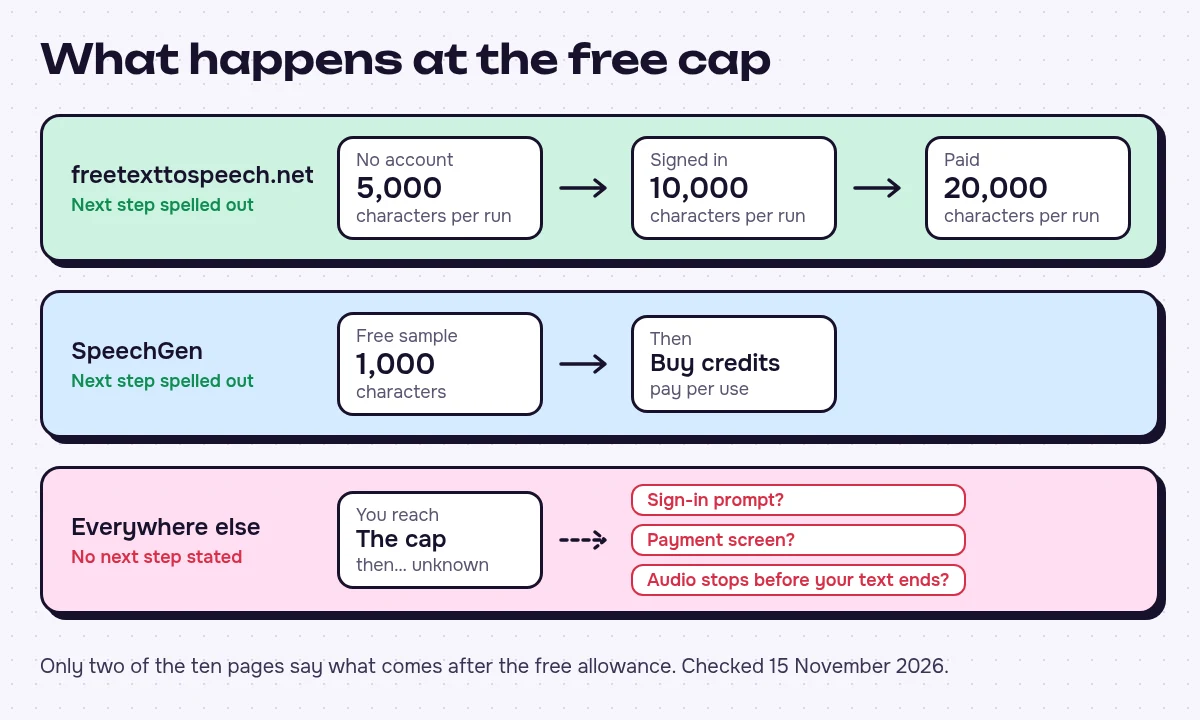
The pages are also vague about what happens at the cap. freetexttospeech.net and SpeechGen are the only two that spell out a next step. On freetexttospeech.net that's an account, then a paid tier. On SpeechGen it's buying credits. Everywhere else you could hit a sign-in prompt, a payment screen, or audio that quietly stops before your text ends. Before you commit a long script, I'd run three checks:
- Paste one sentence and press download. If a login or payment screen appears, you have your answer.
- Paste more text than you need, generate it, and check that the audio ends where your text ends.
- Look for a character counter by the text box. If there isn't one, assume a cap exists until a full text comes back as audio.
Convert text to speech in four steps
- Paste your text. Stay under the tool's per-run cap: 500 on Cartesia, 1,000 on SpeechGen, 5,000 on freetexttospeech.net without an account.
- Pick a voice and language. Match the voice to the language of the text, not the interface language.
- Generate and listen once. TTS stumbles on names, acronyms and numbers. Respell anything that comes back wrong, for example "SQL" as "sequel" or "2026" as "twenty twenty-six", and generate again.
- Download as MP3 or WAV. Choose WAV if you'll edit the audio in a video or audio editor. Choose MP3 for listening or uploading.
Long articles and books
Pick the tool by how long your text is.
- Up to 100,000 characters in one run: NoteGPT's box holds that much, the largest single run of the ten. Test that you can save the output first.
- Longer text, with the joining done for you: freetexttospeech.net says it splits long text into parts and joins them for you. Without an account each part is capped at 5,000 characters, rising to 10,000 when signed in.
- Listening only: UnlimitedTTS imports a PDF and reads it with your device voices. If you won't edit or publish the audio, making files just adds steps.
On small-cap tools like Cartesia (500) or SpeechGen (1,000), you have to chunk by hand. For anything longer than a short article, that's a lot of chunks:
- Split the text at paragraph or section breaks, each piece under the cap.
- Generate every piece with the same voice, speed and language. A voice change midway is the most noticeable flaw in a stitched file.
- Name the files in order (01, 02, 03) and join them in a free audio editor.
Text written for the page often reads badly aloud. Tables, long sentences and bracketed asides trip up every TTS voice, so rewrite those for the ear before you generate.
Privacy, and the fallback with no AI at all
Most web TTS tools send your text to a server to make the audio. An anonymous site gives you no way to know who runs that server or what it keeps. Three of the ten say otherwise:
- SoundTools says it runs in your browser.
- UnlimitedTTS offers private AI voices and your device's own voices.
- freetexttospeech.net has an on-device mode.
These are also the options least likely to hit a server-side cap, because your device does the work.
For text-to-speech with no AI and no limit at all, use the read-aloud or narrator feature built into your phone's or computer's operating system. It's free, needs no website, and keeps the text on your machine. The voices sound plainer, but for long study or accessibility sessions, getting through the text matters more than how natural the voice is.
Contracts, patient notes, client emails and unpublished manuscripts shouldn't go into an anonymous web box. If you need a cloud voice for sensitive text, use a vendor that puts its data terms in writing. WellSaid Labs says it doesn't train on customer content and holds SOC 2 Type II. ElevenLabs lists HIPAA.
Commercial use, tool by tool
None of the ten generator pages says whether you can use the audio commercially. The terms may sit on a separate page, and a "free" tagline isn't a licence. Before generated audio goes into a monetised video, an ad or a client project, find the tool's terms page and search it for "commercial". If a tool has no terms page, I wouldn't use its audio for anything that earns money.
Account-based free plans do usually state a licence, and that licence can be a restriction. Altered Studio's free plan carries an attribution licence that rules out commercial use. The free and paid tiers of the same tool can be licensed differently.
The platform you upload to also sets its own rules on labelling AI-generated audio, separately from the TTS tool's licence.
When a free account is the better deal
If you'll use TTS more than once, a free account with a published quota often beats an anonymous site with no published terms. Six of the seven text-to-speech tools in our directory keep a free plan. These four state their limits in plain numbers:
| Tool | Free plan limit | Cheapest paid plan | API |
|---|---|---|---|
| ElevenLabs | 10k credits per month, 3 Studio projects, credits don't roll over | Starter $6/mo ($5/mo billed yearly) | Yes |
| WellSaid Labs | 3 download minutes, 10 minutes of generation, 3 projects | Starter $10/mo billed yearly ($19 monthly) | Yes |
| Voice.ai | 5k credits per month, 500 characters per conversion | Starter $5/mo | Yes |
| Speechify | Up to 1.5x speed, 10 robotic-sounding voices | Premium $29/mo | Yes |
An account doesn't always lift the per-run limit. Voice.ai caps each conversion at 500 characters, the same as Cartesia's anonymous demo. What the account gives you is a monthly quota you can plan around. WellSaid's free plan counts generation minutes and download minutes separately, which is the hear-versus-keep split written into a price list.
Quick picks by use case
- YouTube voiceover: Skip the anonymous sites unless you've read their terms page, because none of the generator pages states commercial terms. ElevenLabs Starter at $6 a month or WellSaid's Starter tier gives you an account and terms you can read before you upload. For short branded clips, see our ranking of AI voice generators for podcast intros.
- Audiobook or long article: NoteGPT for a single run up to 100,000 characters. Use freetexttospeech.net if you want MP3 or WAV files and automatic joining. Use UnlimitedTTS with PDF import if you only want to listen.
- Studying or accessibility: Your operating system's built-in read-aloud, SoundTools in the browser, or UnlimitedTTS with device voices. Speechify's free plan works if 1.5x speed is fast enough for you.
- Phone or IVR prompt: A greeting fits inside SpeechGen's 1,000 free characters or freetexttospeech.net's 5,000. For a live business line, move to a paid plan such as WellSaid or Murf AI (Creator from $19 a month billed annually), and confirm the licence covers phone use.
FAQ
Which free text-to-speech tool sounds the most natural? I'd write one test passage with a person's name, a number and a question, so you can hear whether the pitch rises at the end. Run it through two or three tools using a voice in the same language and compare. A passage like that exposes weak voices faster than a polished homepage demo does.
Can I get emotion or different speaking styles for free? Two of the ten offer it. Cartesia's Playground has speed and emotion controls, and freetexttospeech.net lists emotion-tagged voices. On tools without style control, punctuation still shapes delivery. Commas and full stops add pauses, and a question mark usually lifts the end of a line.
Do these tools add a watermark or ads? None of the ten pages mentions an audio watermark either way, and SnipSound says it has no paywall. Before you publish, listen to the first and last few seconds of your first downloaded file, because that's where an audio tag would usually sit. Ads on the web page don't end up in the file you download.
Tools in this article 1

Written by
Stanislav Vovchyk
Founder and editor of infobro.ai
I run infobro.ai: I decide what it covers and how tools are evaluated.
I research every tool from its documentation, pricing pages, product screenshots and public developer discussion, and say plainly what the evidence does and does not show.
More guides
Guide
What Is MCP? How ChatGPT and Claude Connect to Your Apps, and What Can Go Wrong
Nov 3, 2026 · 10 min read