
Evernote
Notes, tasks and calendar in one app, with AI search and transcription
Own Evernote? Claim it, free to correct the facts and get the verified badge.
Pricing
Free · from $14.99/mo
Free trial
Yes
Platforms
What is Evernote?
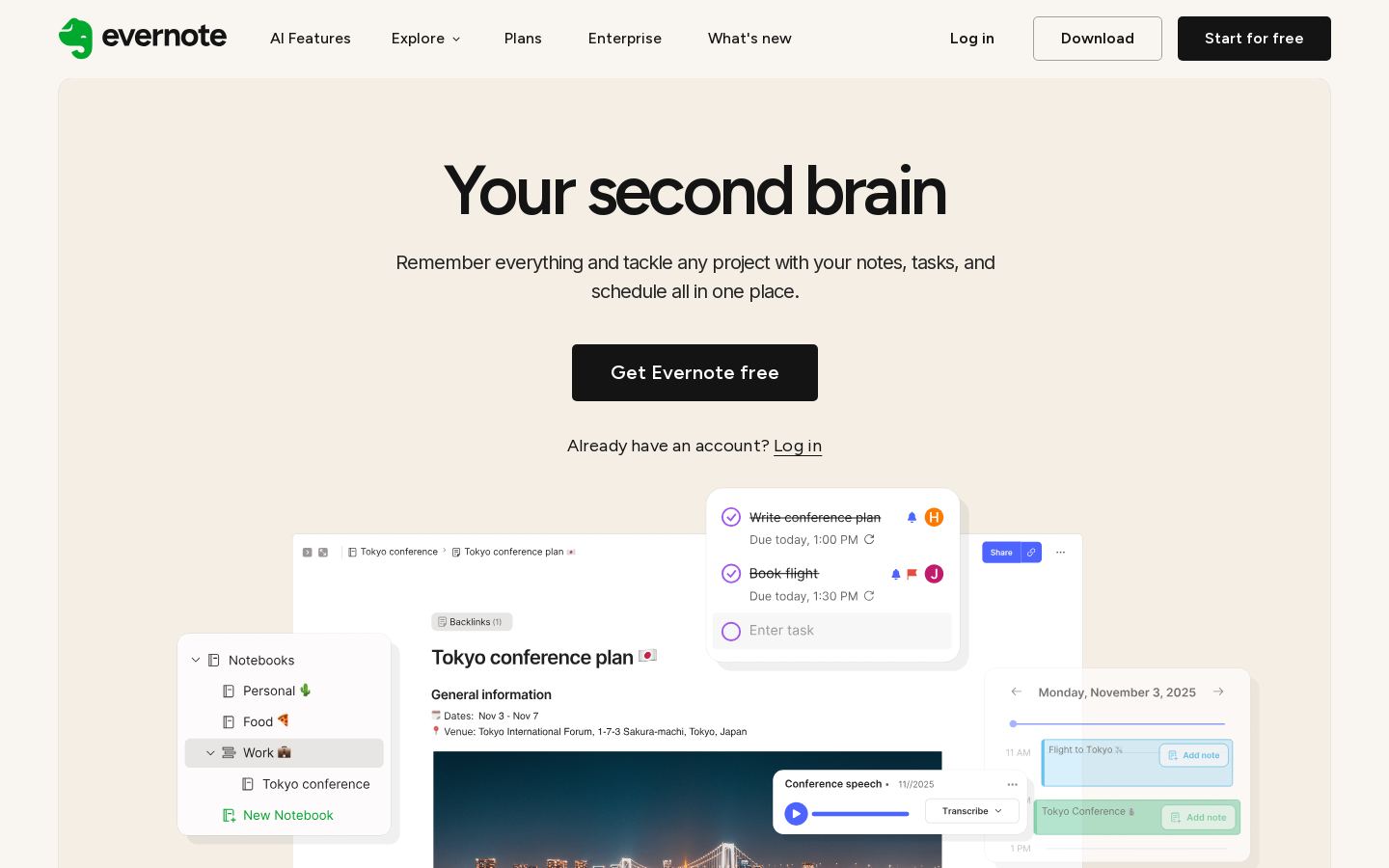
Evernote is a note-taking app that keeps notes, tasks and a calendar in one place. You can use it as a "second brain" for saving information and managing projects. You organize notes into notebooks, spaces and tags, find them later with advanced and semantic search, and save web content with the Web Clipper for Chrome, Firefox and Safari.
Recent versions include an AI Assistant, AI Transcribe, AI Edit and AI Cleanup, which is mobile only. An MCP connection lets external AI tools work with your notes. Evernote connects to Gmail, Google Drive, Google Calendar, Microsoft Outlook and Slack. Teams can collaborate in real time, leave comments and assign tasks.
Evernote runs on the web, Windows, Mac, iOS and Android. A free plan covers light use. Individuals can choose the Starter or Advanced plan, and teams and enterprises can choose the Flexible or Unlimited plan. Evernote is part of Bending Spoons.
Key features
- Notebooks, spaces and tags for organizing notes
- Tasks and built-in calendar with external calendar sync
- Web Clipper for Chrome, Firefox and Safari
- AI Assistant, semantic search and AI Transcribe
- Document scanning and offline notes
- Real-time collaboration with comments and task assignment
- Integrations with Gmail, Google Drive, Outlook and Slack
- MCP connection to external AI tools
Use cases
Who it's for
Personal knowledge base
Save notes, web clips, scans and recordings in one searchable place.
Project and task tracking
Link tasks and calendar events to your notes so project plans and deadlines stay together.
Team documentation
Teams share notebooks and spaces, comment and assign tasks in real time.
Capturing meetings and audio
Turn recordings into searchable text with AI Transcribe.
Evernote pricing
From the vendor's site, checked Oct 26, 2026; we re-check prices monthly. Prices change — confirm on their pricing page.
| Plan | Free | Starter | Advanced | Flexible | Unlimited |
|---|---|---|---|---|---|
| Price | Free | $14.99/mo | $24.99/mo | Per seatper seat | Custom quote |
| Notes | 50 | 1,000 | Unlimited | 500–Unlimited | Unlimited |
| Notebooks | 1 | 20 | Unlimited | — | — |
| Synced devices | 1 | 3 | Unlimited | — | — |
| Storage | 1 GB | 5 GB | Unlimited | — | — |
| Also | — | — | — |
|
|
What the free plan gets you
- 50 notes
- 1 notebook
- 1 device sync
- 1GB storage
| Cost for a team, per month | 1 person | 5 people | 20 people |
|---|---|---|---|
| Starterflat, up to 1 | $14.99 | — | — |
| Advancedflat, up to 1 | $24.99 | — | — |
Billed yearly where the plan offers it. — means the plan doesn't allow that many people.
Which plan do you need?
- CapacitiesPlus AI Power-Up$8.33/mo
- Notion AIPlus$10/mo
- EvernoteStarter$14.99/mo
Prices are per month on yearly billing; these vendors publish no monthly rate. The cheapest paid plan with a published price that fits. Custom and sales-quoted plans aren't included.
Get an email when Evernote changes its prices
One mail per change, a stop link in each. Nothing else.
How Evernote compares
- Evernote has a free plan, like all 4 alternatives below.
| Tool | Starts at | Free plan | Free trial | API | Open source | |
|---|---|---|---|---|---|---|
| EEvernote | $14.99/mo | — | — | |||
N Notion AI | $10/mo | — | Evernote vs Notion AI | |||
C Capacities | $9.99/mo | — | Evernote vs Capacities | |||
R Reflect Notes | — | — | — | Evernote vs Reflect Notes | ||
N NotebookLM | — | — | — | — | Evernote vs NotebookLM |
Compare 8 capabilities
| Capability | Evernote | Notion AI | Capacities | Reflect Notes |
|---|---|---|---|---|
| Local Markdown files | — | — | ||
| Backlinks & graph | — | |||
| Meeting transcription | — | |||
| AI Q&A over notes | ||||
| MCP connector | — | — | ||
| End-to-end encryption | — | — | ||
| Web clipper | ||||
| Shared workspaces | — |
Capabilities as stated on each vendor's own site; — means the site doesn't say. The closest alternatives in our directory by category. “Starts at” is the cheapest paid plan per month, as each vendor lists it.
Evernote data and privacy
Trains AI on your content
Not stated
Data retention
Not stated
Where data is stored
Not stated
Security and compliance
From Evernote's own privacy and security pages , checked Oct 28, 2026. We only show what the vendor states in writing; “not stated” means the pages don't say.
Who's behind Evernote
- Company
- Bending Spoons US Inc.
- Based in
- United States
- Part of
- Bending Spoons
“Careers About Bending Spoons Get Started”
From Evernote's own about, terms and privacy pages, checked Oct 28, 2026.
Pros and cons
Strengths
- Free plan available
- Apps for web, Windows, Mac, iOS and Android
- Paid plans come with a 7-day free trial, and Enterprise gets 14 days
- Eligible college students get 40% off a year of Advanced
Limitations
- Free plan is limited to 50 notes, 1 notebook and 1 device
- Starter syncs on only 3 devices
- AI Cleanup is mobile only
Evernote FAQ
Is there a free plan?
Yes. The free plan includes 50 notes, 1 notebook, sync on 1 device and 1 GB of storage.
How much do paid plans cost?
Evernote's help center lists Starter at $14.99 per month and Advanced at $24.99 per month in USD. Team plans are priced per seat or through sales.
Is there a free trial?
Yes. Paid plan trials last 7 days unless stated otherwise, and Enterprise trials last 14 days.
Which platforms are supported?
Web, Windows, Mac, iOS and Android, plus Web Clipper extensions for Chrome, Firefox and Safari.
What AI features are included?
AI Assistant, semantic search, AI Transcribe, AI Edit, AI Cleanup (mobile only) and an MCP connection to AI tools.
Used Evernote? Rate it
Sign in to rate this tool and share how you use it.
Evernote
Free · from $14.99/mo