Best of
Top 10 AI Automation & Workflow Tools in 2026: Ranked by Real-World Impact
May 17, 2026 · 16 min read

Visual workflow automation and AI agent builder, cloud or self-hosted
Own n8n? Claim it, free to correct the facts and get the verified badge.
Pricing
Freemium
Free trial
Yes
Company
n8n GmbHGermany
GitHub stars
208.8K
Platforms
n8n is the strongest pick for technical teams that want control over logic, data and hosting, and per-execution billing keeps long multi-step flows cheap. The weak points are a steep jump from Pro (€50/mo) to Business (€667/mo, self-hosted only) and forum-only support below Enterprise. Teams without a developer should look at Zapier or Make instead.
Best for: Developers and technical ops teams building production-grade automation
Read the full reviewn8n is a workflow automation platform for building AI agents and multi-step automations in a visual editor. Each step of a workflow can be opened to see what it does, and you can add code where you need it. It has 500+ native integrations, can call any API over HTTP, and can connect agents or coding assistants through MCP.
Teams can watch agents run live or review past runs. They can require human approval before an AI action goes ahead, for example through a request sent to Slack, and re-run only the step that failed. Version history records who changed what and when. Enterprise controls include SSO (SAML), LDAP, RBAC, audit logs, log streaming and Git-based version control.
n8n runs as a cloud service or self-hosted with Docker or on-prem. A self-hosted Community Edition is available on GitHub. It suits technical and operations teams that want automations they can audit.
Who it's for
Automate finance workflows, with human approval steps before AI actions go through.
Route and enrich alerts automatically, and keep a record of every run for review.
Score and route incoming leads across connected CRM and communication tools.
Build AI agents that answer team questions using company data sources.
From the vendor's site, checked Oct 26, 2026; we re-check prices monthly. Prices change — confirm on their pricing page.
Community Edition
Free (self-hosted)
Starter
month
€20/mo billed annually
Pro
month
€50/mo billed annually
Business
month
€667/mo billed annually
Enterprise
Custom
What the free plan gets you
| Tool | Starts at | Free plan | Free trial | API | Open source | |
|---|---|---|---|---|---|---|
| Nn8n | — | — | — | |||
Z Zapier | $19.99/mo | — | n8n vs Zapier | |||
M Make | $9/mo | — | — | n8n vs Make | ||
M Microsoft Power Automate | $15/mo | — | — | — | n8n vs Microsoft Power Automate | |
S Smartsheet | $9/mo | — | — | n8n vs Smartsheet |
| Capability | n8n | Zapier | Make | Microsoft Power Automate | Smartsheet |
|---|---|---|---|---|---|
| Self-hosting | — | — | — | — | |
| MCP server | — | ||||
| AI agent builder | — | ||||
| Custom code steps | — | — | — | ||
| Prompt-to-workflow | — | — | |||
| Desktop RPA | — | — | — | — | |
| Custom connectors | — | ||||
| Embedded integrations | — | — | — | — |
Capabilities as stated on each vendor's own site; — means the site doesn't say. The closest alternatives in our directory by category. “Starts at” is the cheapest paid plan per month, as each vendor lists it.
Trains AI on your content
No
“We do not use personal data processed in connection with the Website or Services, including data from third-party services or integrations, to train n8n or third party machine learning (ML) models.”
Data retention
Execution data deleted automatically based on account's retention settings
“The platform deletes execution data automatically based on your account’s retention settings.”
Where data is stored
Not stated
Security and compliance
From n8n's own privacy and security pages , checked Oct 28, 2026. We only show what the vendor states in writing; “not stated” means the pages don't say.
Strengths
Limitations
 Stanislav VovchykUpdated Oct 29, 202611 min read
Updated October 2026
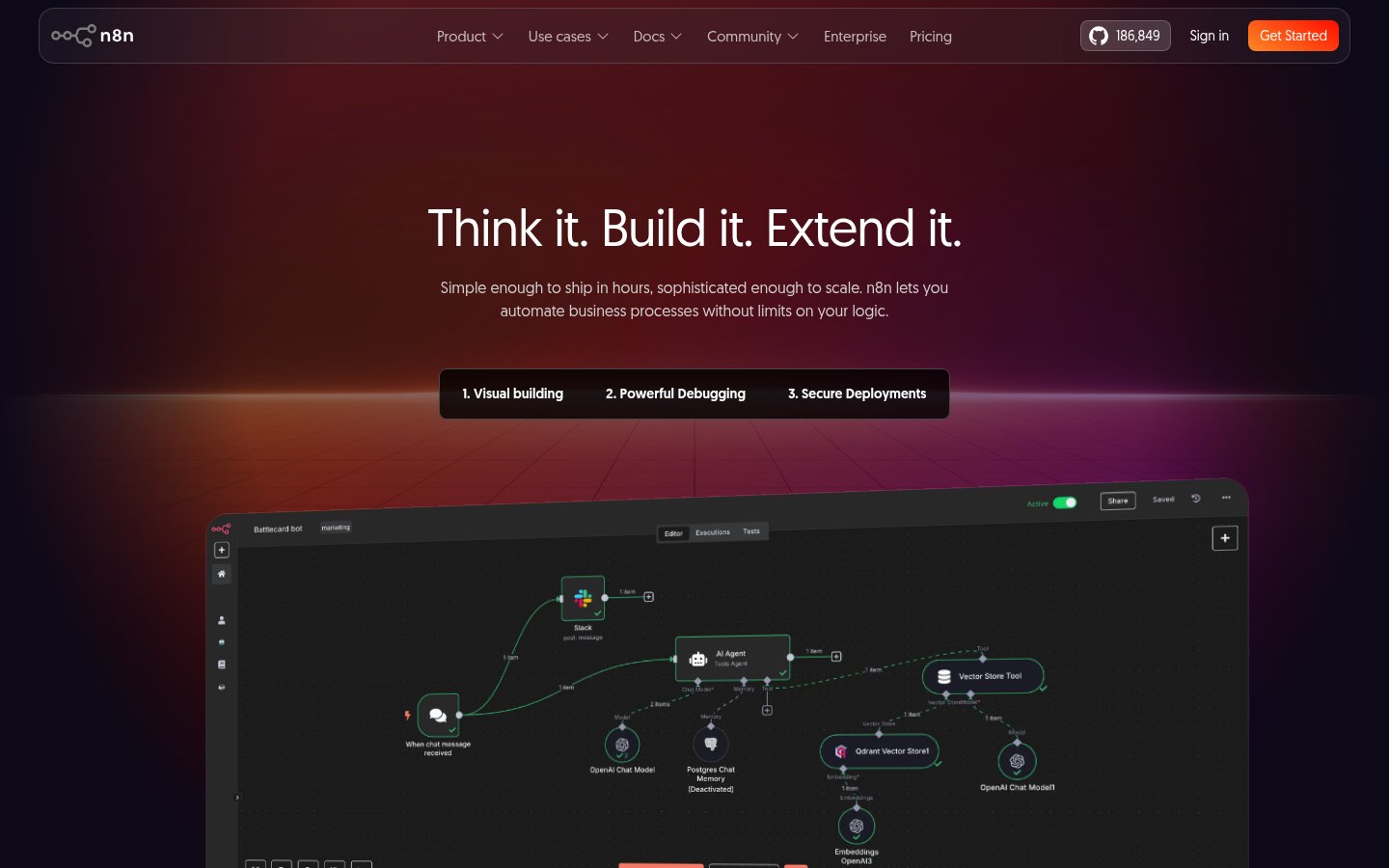
n8n counts a whole workflow run as one execution, however many steps it contains, and that one rule shapes the rest of the product. You build on a visual canvas where each node shows its inputs and outputs next to its settings. There are 500+ native integrations, an HTTP node for any API that lacks one, and code steps in JavaScript or Python for everything else. Parameters accept expressions, so a field mapping can compute a value instead of just copying one.
The debugging tools are the main reason developers pick n8n over Make. The vendor's pages describe replaying a past run, mocking data so you can skip waiting on external systems, and re-running only the failed step. On a 40-step flow that calls a rate-limited API, re-running one step instead of the whole chain saves both calls and time.
History is thin on the cheapest plan. The cloud plan comparison gives Starter 1 day of workflow history, Pro 5 days and Enterprise 365+. If you debug incidents that surface a week later, Starter won't hold the evidence.
The AI layer sits in the same canvas. The AI Agent node, MCP Server Trigger and MCP Client are included on every cloud plan, Starter too, so you can expose a workflow as an MCP server or call external MCP tools without paying extra. Human approval steps can route through Slack, which suits agents that touch payments, tickets or CRM records.
Self-hosting that covers the AI stack. The Community Edition is on GitHub and had 208,818 stars at the last check, which puts it among the most-starred projects on the platform. The features page describes a fully self-hosted AI setup using Ollama, Qdrant and PostgreSQL, with no external data transfer. It also lists Docker Hardened Images, distroless containers and running workflows as unprivileged users. For a team with a data residency rule, that's a concrete deployment path, not a marketing line. On Enterprise, credentials can come from AWS Secrets Manager, Azure Key Vault or HashiCorp Vault without being stored in n8n.
The hosted side is documented too. n8n GmbH, a German company, states SOC 2 and GDPR compliance, says it doesn't use customer content to train AI, and deletes execution data according to your retention settings.
Agents you can open up afterwards. n8n's pitch is that you can open any past run and see what each step did, including agent decisions. Pro adds metric-based evaluations, and the Enterprise tier lists guardrails. That's the right shape for anything that acts on real systems, because you can check a bad decision after the fact instead of guessing.
The vendor's own case studies give the headline numbers. Huel reports 1,000 hours saved, and Vodafone reports a £2.2M security operations win using n8n for SOAR-style workflows. Both are n8n-published, so read them as best-case results from teams with engineers to spare.
Git and environments, but only on Business. Version control through Git, multiple environments, queue mode for scaling, SSO and LDAP all arrive at the Business tier. Workflow diffs make it possible to see what changed before a regression ships. That's table stakes for an engineering team, and it's a shame the entry point is the most expensive self-serve plan.
The low-code claim holds for two-step flows. Branching, looping and reshaping data need expressions, and expressions need working JavaScript. A team without a developer will stall, and Zapier's approach suits that team better.
Business is self-hosted only. You can't buy SSO or Git on n8n's cloud below Enterprise. Self-hosted licensed features also need a daily check-in with n8n's license server, so a locked-down network or an air-gapped deployment needs a conversation with sales before you commit.
Support is forum-only on everything below Enterprise, and that includes Business at €667 a month. Dedicated support with an SLA sits in the custom-priced tier. If an outage costs you money, price that in.
Concurrency is a planning constraint. Starter allows 5 concurrent executions, so a webhook that receives a burst of events will queue behind them. Pro goes up to 50, which is workable for most small teams. Enterprise starts at 200+.
The in-product Assistant is labelled preview. Starter gets 1,600 credits a month and Pro up to 9,600. On Business it's listed as preview, and on Enterprise it's available on request, so don't build a process around it yet.
Finally, default error behaviour on a failed node is to stop the run. Long batch jobs need an error workflow you design yourself.
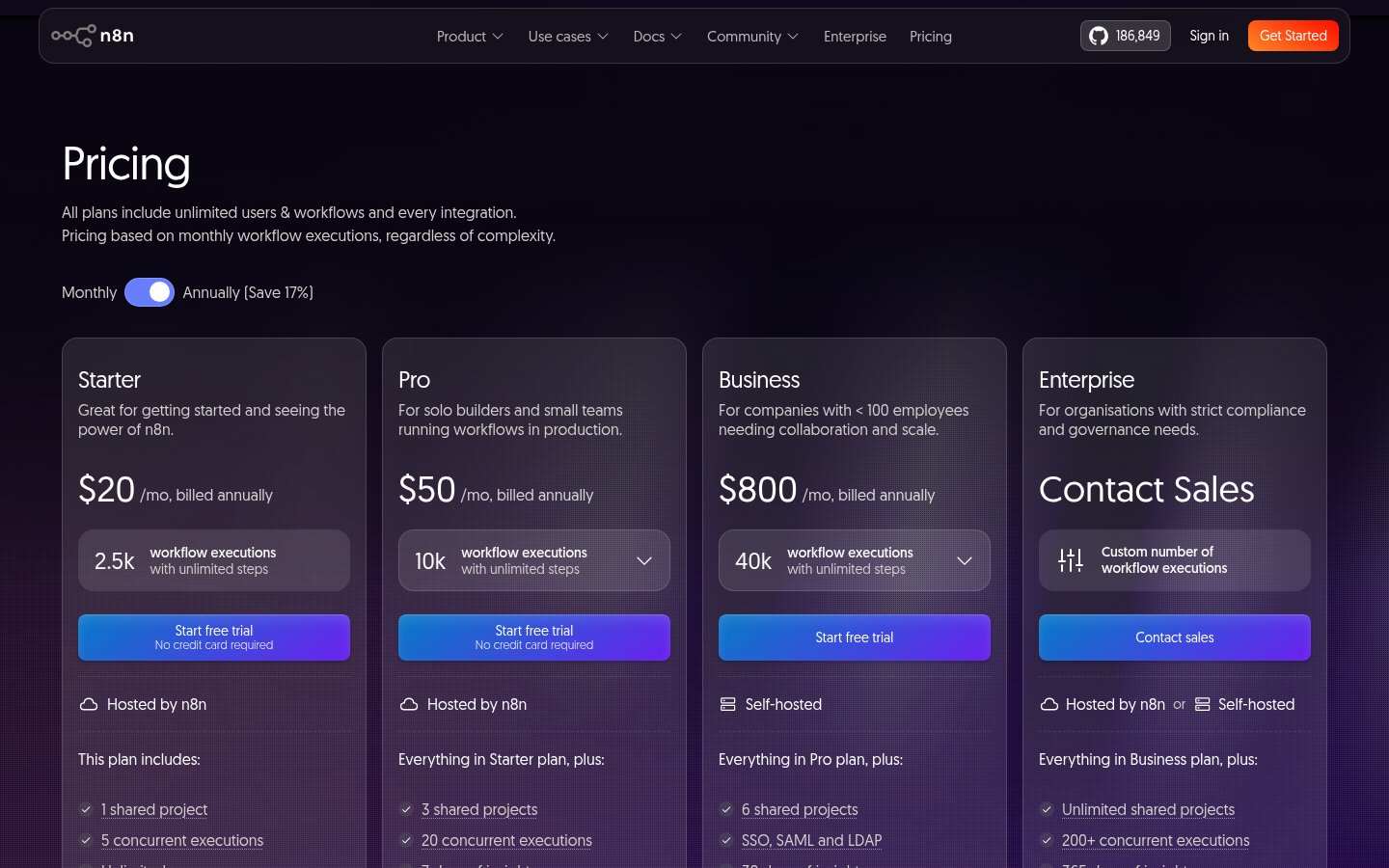
As of October 2026, Starter is €20 a month for 2,500 executions and Pro is €50 a month for 10,000, both billed annually. At full use, Pro works out to €0.005 per execution. Every plan includes unlimited users and workflows, so adding colleagues doesn't raise the bill. That's the opposite of per-seat tools, and it's why n8n suits a team where several people edit the same automations.
Step count is where the gap with per-task billing opens. A flow with 12 nodes costs one execution on n8n. On a platform that meters tasks, it can cost many more, so the longer your flows, the more n8n wins. For short two- or three-step zaps, run your own volumes through both pricing pages first, because the gap narrows.
The weak spot is Business at €667 a month for 40,000 executions. That's more than 13 times the Pro price for 4 times the executions, and what you're buying is SSO, LDAP, Git, environments and queue mode. Teams under 20 employees can ask for the Startup plan, which takes 50% off Business. If you don't qualify and only need Git, self-hosting the free Community Edition and managing your own deployment is the cheaper route. For options beyond n8n, open source Zapier alternatives by licence and self-hosting cost lays out what each costs to run.
Pick n8n if you're a developer, DevOps engineer or technical ops team that wants production automation with control over where data lives. It fits long multi-step flows, AI agents with approval gates, and compliance-sensitive processing. It also fits anyone who'd rather run the free Community Edition on their own infrastructure than rent a hosted tool.
Skip it if nobody on your team writes code, or if you only want to connect two apps this afternoon. Zapier will get you running faster, and Make has a friendlier canvas for data routing. Skip it, too, if you need hosted SSO or Git but can't justify Enterprise pricing, because Business forces you to self-host.
The free cloud trial needs no credit card, but it's limited to 1,000 executions, 5 concurrent executions, a 180-second execution timeout and 1 team project. Long-running jobs and multi-project permissions can't be properly tested inside it. If SSO or Git is the reason you're evaluating, plan on a self-hosted instance from day one, since Business can't be hosted by n8n.
Cloud plans start at €20/month (Starter, billed annually), then Pro at €50/month and Business at €667/month. Enterprise pricing is custom.
Yes. A standard self-hosted Community Edition is available on GitHub, and there is a cloud trial that needs no credit card.
Pricing is based on monthly workflow executions, regardless of complexity. All plans include unlimited users and workflows.
Yes, on-prem or with Docker. You can unlock Business and Enterprise features on a self-hosted instance with a license key.
No reviews yet. Used n8n? Be the first.
Sign in to rate this tool and share how you use it.
Best of
May 17, 2026 · 16 min read
Best of
May 10, 2026 · 16 min read
Guide
Jun 11, 2026 · 12 min read
Guide
May 14, 2026 · 11 min read
n8n
Freemium
No-code workflow automation and AI agents across 9,000+ apps for businesses
Visual no-code platform for building AI agents and automated workflows
Low-code cloud, desktop RPA and process mining automation for enterprises