Do I Need a GPU to Run an LLM Locally? Not for Small Models
A CPU can run a small LLM. Match your laptop, Mac or gaming PC to a model size, see the speed ceiling without a GPU, and find the price above which a GPU loses to a subscription or an API.
 Stanislav VovchykNov 22, 202616 min read
On this page · 11 sections
- 1. Find the largest LLM your machine can run
- 2. Allow 0.6 to 0.65GB per billion parameters at Q4
- 3. Memory bandwidth limits how fast each token arrives
- 4. Mixture-of-experts models stretch a CPU-only desktop
- 5. The best LLM without a GPU depends on your RAM
- 6. Macs share one pool of memory between CPU and GPU
- 7. An integrated GPU or NPU won't lift the memory ceiling
- 8. Set up Ollama in five steps and check where the model loads
- 9. The budget GPU I'd buy is a 16GB RX 9060 XT
- 10. Skip the GPU if it costs more than three years of hosted AI
- 11. FAQ
In short
- You don't need a GPU for small models: an 8GB laptop can run a 3B model, and a 16GB laptop with dual-channel DDR5 can run an 8B, using quantized files in Ollama or llama.cpp.
- Size models at 0.6 to 0.65GB per billion parameters at Q4, plus 2GB for normal chat context and room for the operating system.
- Memory bandwidth divided by model size caps speed. For about 10 tokens per second, aim for a ceiling of 15 on a PC, about 14 on a base or Pro Mac and about 19 on a Max.
- At November 2026 prices, 16GB cards at $730 to $800 rarely pay for themselves against hosted AI in three years, so buy one for privacy or offline use rather than savings.
No, you don't need a GPU to run an LLM locally. A CPU can run quantized (compressed) GGUF models through Ollama or llama.cpp. An 8GB laptop runs 3B (billion parameters), 16GB runs 8B, and 32GB stretches to 14B or a 30B mixture-of-experts model if you'll wait. You need a GPU, or a Mac with fast unified memory, for big standard models, long inputs or responsive coding agents.
Andrew Zuo argues you need a fast GPU and ideally over 100GB of fast memory. That may apply to much larger models, but for small ones XDA is right that a CPU will do: qwen3:4b is a 2.5GB download.
Find the largest LLM your machine can run
A speed ceiling is memory bandwidth divided by model size, here estimated at 0.6GB per billion parameters. Real speed is lower. For about 10 tokens per second in use, I'd look for these ceilings:
- PC on the CPU: at least 15. That margin is my judgement, so check your own speed after setup.
- Mac with a base or Pro chip: about 14.
- Mac with a Max chip: about 19.
| Hardware you own | Largest practical model at Q4 (4-bit) | Best-case tokens/sec | Good for | Not good for |
|---|---|---|---|---|
| 8GB laptop, single-channel DDR4-3200 | 3B, marginal | 14 | Rewriting, short replies | Quick chat (use a 1B), documents |
| 8GB laptop, dual-channel DDR4-3200 | 3B | 28 | Short chat and summaries | 8B models, agents |
| 16GB laptop, single-channel DDR4-3200 | 8B, slow | 5 | Short jobs you can leave running | Live chat (use a 1B) |
| 16GB laptop, dual-channel DDR4-3200 | 8B, slow | 11 | Drafts you can wait for | Quick chat (use 4B) |
| 16GB laptop, dual-channel DDR5-5600 | 8B | 19 | Chat, email drafts | Long documents |
| 32GB desktop, dual-channel DDR5-5600 | 8B for chat; 14B if you'll wait | 19 for 8B, 11 for 14B | Chat at 8B, drafts at 14B, harder jobs with 30B MoE | Coding agents |
| 32GB desktop, dual-channel DDR4-3200 | 8B; 14B, slow | 11 for 8B, 6 for 14B | Drafts you can wait for | Quick chat at 14B |
| 64GB desktop, dual-channel DDR5-5600 | 32B, slow | 4.7 | Unattended jobs | Live chat at 32B |
| Gaming PC, desktop RTX 4060 8GB (272GB/s) | 8B | 57 | Chat, short code questions | 14B entirely on the card |
| 8GB Mac, M1 (68GB/s) | 3B | 38 | Chat, rewriting | 8B models |
| 8GB Mac, M2 or M3 (100GB/s) | 3B | 56 | Chat, rewriting | 8B models |
| 16GB Mac, M1 (68GB/s) | 8B | 14 | Short chat, drafts | 14B models, long documents |
| 16GB Mac, M2 to M5 (100 to 153GB/s) | 8B | 21 to 32 | Chat, summaries | 32B models |
| 24GB Mac, M4 (120GB/s) | 14B | 14 | Chat, better answers on short prompts | 32B models |
| 48GB Mac, M4 Pro (273GB/s) | 32B | 14 | Chat at 32B, just at the target | Long prompts, 70B models |
| 48GB Mac, M5 Pro (307GB/s) | 32B | 16 | Chat at 32B | 70B models |
| 48GB Mac, M3, M4 or M5 Max (400 to 614GB/s) | 32B | 21 to 32 | Fast chat at 32B | 70B models |
The Mac targets follow llama.cpp's Apple Silicon benchmark, run on the GPU through Metal. A 7B Q4 file of about 3.8GB ran at 14.19 tokens per second on an M1 and 50.74 on an M4 Pro, roughly 79% and 71% of their ceilings. Max chips reached about 52% to 75%.
If your row covers the job, don't buy anything. A token is usually a bit less than a word. At 10 tokens per second in use, a 300-token answer takes 30 seconds, which I'd accept for chat because you can read as it streams. At 3 tokens per second it takes 100 seconds, and a 2,000-token answer takes 11 minutes. I'd save that speed for jobs I could walk away from.
Allow 0.6 to 0.65GB per billion parameters at Q4
A model's parameters are its weights. At exactly 4 bits each, a billion take 0.5GB, but common Q4 files such as Q4_K_M use more than that. Treat 0.6 to 0.65GB per billion as an estimate and let the listed file size override it. Llama 3.2 3B, for instance, is about a 2GB download in Ollama.
The sizing rule is model file size plus overhead for context must fit in RAM or VRAM. I'd add 2GB for a normal chat. That overhead grows with the context setting, so check ollama ps again after raising it. On system RAM or a Mac, leave room for the operating system and your apps too.
| Model size | Estimated Q4 weights | Estimated Q8 (8-bit) weights | Q4 total with 2GB context | PC RAM, CPU only | Mac unified memory | VRAM, fully on GPU |
|---|---|---|---|---|---|---|
| 3B | 1.8 to 2GB | 3GB | 3.8 to 4GB | 8GB | 8GB | 4GB tight, 6GB comfortable |
| 7B to 8B | 4.2 to 5.2GB | 7 to 8GB | 6.2 to 7.2GB | 16GB | 16GB | 8GB |
| 13B to 14B | 7.8 to 9.1GB | 13 to 14GB | 9.8 to 11.1GB | 16GB tight, 32GB comfortable | 24GB | 12GB, or 16GB for longer context |
| 32B | 19.2 to 20.8GB | 32GB | 21.2 to 22.8GB | 32GB tight, 48GB comfortable | 48GB | 24GB for short context |
| 70B | 42 to 45.5GB | 70GB | 44 to 47.5GB | 64GB | 64GB | 48GB, very tight |
Quantization trades precision for memory and speed. Four bits can represent 16 distinct values and eight can represent 256, so Q4 rounds the weights more coarsely and can lose some quality. Q8 costs a lot on a CPU: an 8B grows from about 5GB to 8GB, and its best case on dual-channel DDR4 drops to 6 tokens per second. I'd use Q4 by default, and on a tight machine I'd take a smaller model at Q4 over a bigger one at Q2.
Memory bandwidth limits how fast each token arrives
A standard model reads all its weights to produce each token, so memory speed caps the output. For PC RAM, bandwidth in GB/s is the number on the label times 8 times the number of channels, divided by 1,000. Two channels of DDR4-3200 give 51.2GB/s. For a graphics card, it's the memory speed in Gbps times the bus width in bits, divided by eight. Divide bandwidth by model size to get the ceiling.
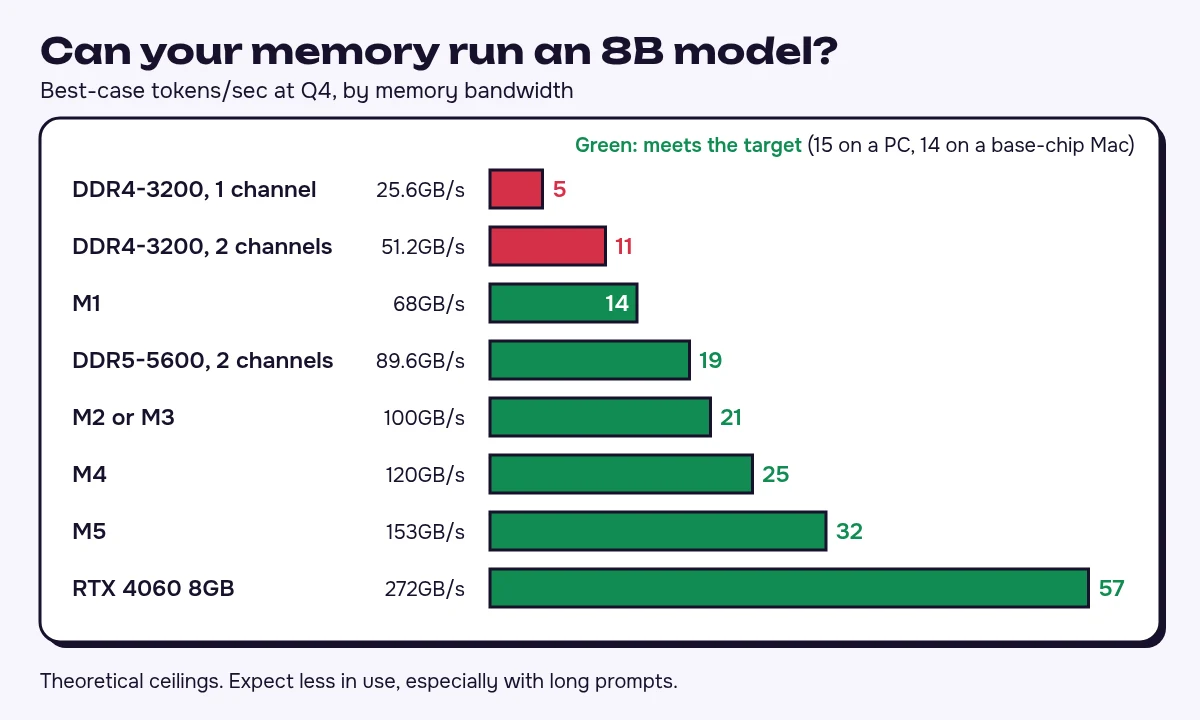
A larger file lowers these numbers. Extra CPU cores can't raise them, because the cores wait on the same RAM. A GPU helps when its memory is faster and the model fits inside it.
The cheapest upgrade may be a stick of RAM. If your laptop supports two channels and has one stick and an empty slot, a matching second stick doubles both the theoretical bandwidth and the capacity. Bigger sticks at the same speed and channel count won't speed up a model that already fits.
The machine also has to process your whole prompt before the first word appears. I'd use CPU-only for questions, rewrites and summaries of a page or two. I wouldn't use it for a long contract, or for a coding agent that keeps sending files back to the model.
Mixture-of-experts models stretch a CPU-only desktop
Mixture-of-experts (MoE) models, such as Qwen3 30B-A3B, use only part of the model for each token. Qwen's model card lists 30.5B in total and 3.3B active.
You still need memory for all 30B, about 18 to 19.5GB at Q4 before context, so it belongs on a 32GB machine. Reading only the active 3.3B gives a paper ceiling of about 26 tokens per second on dual-channel DDR4 and 45 on DDR5, but don't expect either speed. If you own a 32GB desktop and an 8B isn't good enough, I'd try one before pricing a card.
The best LLM without a GPU depends on your RAM
For most 16GB laptops I'd start with qwen3:4b. Its best case is about 20 tokens per second on dual-channel DDR4, so it has a chance at 10 in use where an 8B has very little.
| Your RAM | Model to try | Ollama tag | Download | Best use |
|---|---|---|---|---|
| 8GB or 16GB, single-channel | Llama 3.2 1B | llama3.2:1b | 1.3GB | Quick, simple chat |
| 8GB dual-channel | Llama 3.2 3B | llama3.2:3b | 2.0GB | Short chat and rewriting |
| 16GB dual-channel DDR4 | Qwen3 4B | qwen3:4b | 2.5GB | General chat |
| 16GB dual-channel DDR5 | Qwen3 8B | qwen3:8b | 5.2GB | Chat and summaries |
| 32GB, smaller download | Qwen3 14B | qwen3:14b | 9.3GB | Better answers on short prompts |
| 32GB, biggest model | Qwen3 30B-A3B | qwen3:30b | 19GB | Harder questions when you can wait |
Llama 3.2 dates from 2024 and Qwen3 from 2025. They stay in the table because their files are light. The newer qwen3.5:4b is a 3.3GB download and qwen3.5:9b is 6.6GB. On dual-channel DDR4 the 4B barely reaches a ceiling of 15, and on DDR5-5600 the 9B drops to about 14. Try them if you have memory speed to spare. gemma4:e2b is 4.6GB, too heavy for quick chat on DDR4.
Macs share one pool of memory between CPU and GPU
An Apple Silicon Mac is the other route. Its built-in GPU works from unified memory, so you can load a big model without a discrete card. The memory you choose at purchase sets the size limit, and the chip's bandwidth sets the speed limit.
For about 10 tokens per second in use from a base or Pro chip, look for at least 68GB/s for an 8B, 118GB/s for a 14B and 269GB/s for a 32B. A Max chip needs about 365GB/s for a 32B. These are minimums at 0.6GB per billion, and a larger file needs more: the 5.2GB qwen3:8b puts an M1 just short, and the 9.3GB qwen3:14b does the same to an M4. None of the chips above is quick enough for a 70B. I'd choose the capacity first, then step up a chip if its bandwidth falls short for that size.
For a 14B, a PC with an RX 9060 XT beats a base M4 Mac: on the 9.3GB qwen3:14b file the ceiling is about 34 against 13. A 32B won't fit on that card. If I needed one, I'd buy a 48GB Mac with an M5 Pro, because an M4 Pro only just reaches the target, provided the upgrade passes the payback or privacy test below.
An integrated GPU or NPU won't lift the memory ceiling
Ollama's GPU documentation lists Vulkan for additional GPUs on Windows and Linux, with driver instructions for Intel, so check whether your AMD or Intel integrated GPU is covered. It lists no NPU backend. In an ordinary dual-channel laptop, an integrated GPU draws on system RAM, so that RAM still limits model size and top speed. It can take work off the CPU, but I'd spend on more or faster memory before paying extra for either chip. For a PC sold with fast unified memory, get the GB/s figure from its maker and divide it by the model's file size to get its ceiling.
Set up Ollama in five steps and check where the model loads
- Install Ollama: use the app from its download page on macOS or Windows, or run
curl -fsSL https://ollama.com/install.sh | shon Linux. Without a supported GPU it runs on the CPU. - Pick the tag for your RAM from the model table above.
- Download it, for example with
ollama pull llama3.2:3b. - Run
ollama run llama3.2:3b --verbose. After each answer, "eval rate" shows your tokens per second and "prompt eval rate" shows how fast it read your input. - In a second terminal, run
ollama ps. The processor column shows whether the model sits on the CPU, the GPU or both.
If you'd rather avoid the terminal, LM Studio is a desktop app with a free plan, and its privacy terms say it doesn't train on your content.
Test with a prompt as long as the ones you use at work, since a one-line question hides the wait on long input. To raise the context, type /set parameter num_ctx 8192 inside a chat, then run ollama ps again, because a model that fitted in VRAM can spill out.
The budget GPU I'd buy is a 16GB RX 9060 XT
Get 16GB of VRAM, and read the listing carefully, because both cards below also come in 8GB versions under almost the same name. The prices are the cheapest new cards at Newegg on November 17, 2026, as recorded by price tracker GPUDrip.
| 16GB card | Memory bandwidth | 14B ceiling, 9.3GB file | Price | Verdict |
|---|---|---|---|---|
| AMD RX 9060 XT | Up to 320GB/s | 34 | $729.99 | My pick if you must buy |
| Nvidia RTX 5060 Ti | 448GB/s | 48 | $799.99 | Pay more only for speed |
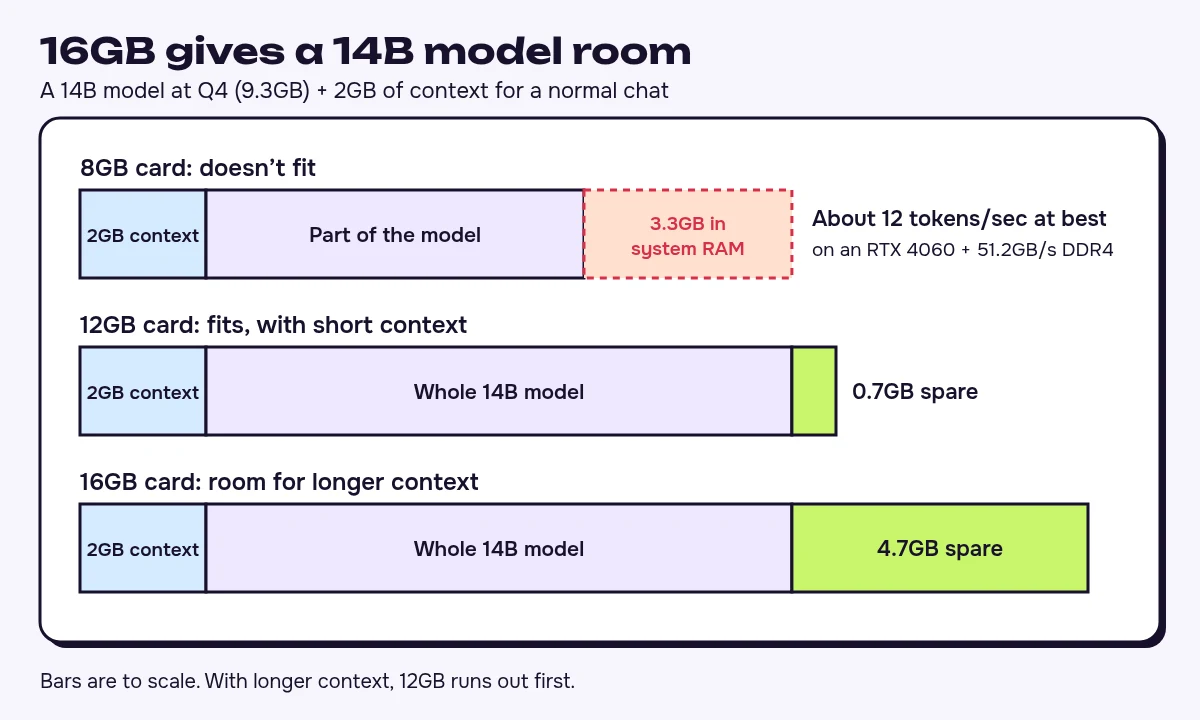
With qwen3:14b and a normal chat loaded, a 12GB card has 0.7GB spare and a 16GB card has 4.7GB. Buy 12GB only if it's far cheaper. An 8GB card is worth using if you own one, but not worth buying for LLMs. For coding or documents that need long context, go to 24GB and stay at 14B to 20B. On a used card, check the bandwidth, return window and power supply, and apply the payback limit to it.
If you already own a small card, partial offload splits the model's layers between VRAM and system RAM. That 14B with context overflows an 8GB card by 3.3GB. On an RTX 4060, reading 6GB from the card and 3.3GB from 51.2GB/s DDR4 limits output to about 12 tokens per second.
Ollama picks the split for you, and ollama ps shows it as CPU and GPU percentages. To change it, type /set parameter num_gpu 20 inside a chat, where 20 is the number of layers sent to the GPU. Lower the number if loading fails.
Skip the GPU if it costs more than three years of hosted AI
Privacy and offline use are good reasons to run locally. Saving money often isn't, if you need new hardware first. Here's what hosted use costs with two tools from our local and open models category, plus ChatGPT.
| Hosted option | Free route | Paid price | Trains on your content |
|---|---|---|---|
| Ollama cloud models | None, pay per token without a subscription | Pro $20/mo | No |
| Mistral | Limited messages | Pro $14.99/mo before tax | Yes by default, opt-out available |
| ChatGPT | Free plan | Go $8/mo (US), Plus $20/mo | Yes by default, opt-out available |
DeepSeek lists its flash API at $0.15 per million input tokens on a cache miss and $0.60 per million output off-peak. Its v4-pro model costs $0.66 and $1.98, and peak rates are double for both. The API rows below assume a heavy personal month of 10 million tokens in and 2 million out. At half that use, halve those limits.
I'd give a card three years to pay for itself:
| What the GPU would replace | Monthly cost | Don't pay more for a GPU than |
|---|---|---|
| DeepSeek flash, off-peak | $2.70 | $97 |
| DeepSeek flash, peak | $5.40 | $194 |
| ChatGPT Go | $8 | $288 |
| DeepSeek v4-pro, off-peak | $10.56 | $380 |
| Mistral Pro | $14.99 | $540 |
| ChatGPT Plus | $20 | $720 |
| DeepSeek v4-pro, peak | $21.12 | $760 |
Take electricity off each limit. At November's prices, the $729.99 RX 9060 XT misses every limit except v4-pro at peak rates, and clears that one only if three years of power cost about $30 or less. The $799.99 RTX 5060 Ti misses all seven. If saving money is your only reason, don't buy either. Count any saving only if the smaller local model can do the whole job. For a Mac, apply the limit to the extra cost of the larger memory tier over the one you'd buy anyway. Prices move, so redo the sum on the day you buy.
I'd skip local models in three cases:
- You need frontier-level answers. An 8B won't deliver them at any speed, and a 16GB card doesn't change that.
- You work through long documents on an 8GB or 16GB laptop. A hosted, source-bound tool such as the one in our NotebookLM review suits the job better, provided the files can leave your machine.
- You want fast agentic coding from a 32B or larger model on 24GB of VRAM or less. The long context won't fit. Use a hosted agent instead (our Codex plan breakdown shows what each ChatGPT tier includes).
If confidential data rules out hosted services, I'd ignore the payback limit and buy for the smallest model that does the job. For private code, Tabby is an open-source assistant whose free Community plan supports local deployment.
FAQ
Does everything I run in Ollama stay on my computer?
No. Cloud models sit alongside the local ones, and requests to those leave your machine. For confidential work, confirm that the model you picked is a downloaded one before you paste anything in.
Can my laptop use the GPU in my desktop?
Yes. On the desktop, set OLLAMA_HOST=0.0.0.0:11434 and restart Ollama. On the laptop, set OLLAMA_HOST to the desktop's local IP address with the same port, then use ollama run as usual. Don't forward that port to the internet. For an end-to-end encrypted link, LM Studio's free plan includes LM Link for up to five devices. The desktop's memory decides which models fit.
Will a 16GB card fit in my desktop?
Check four things before you order: a free PCIe x16 slot, enough length and width in the case, a power supply that meets the card maker's recommended wattage, and the right power connectors. If you'd have to replace the power supply, count that cost inside your GPU budget.






Written by
Stanislav Vovchyk
Founder and editor of infobro.ai
I run infobro.ai: I decide what it covers and how tools are evaluated.
I research every tool from its documentation, pricing pages, product screenshots and public developer discussion, and say plainly what the evidence does and does not show.
More guides