How Small E-Commerce Stores Should Set Up AI Customer Service
A vendor-neutral setup order for small online stores: what to automate, what to write first, worked monthly bills at 300 and 1,000 tickets across per-outcome, per-conversation and flat-seat pricing, and the guardrails to set before launch.
 Stanislav VovchykAug 6, 202613 min readUpdated Nov 4, 2026
On this page · 9 sections
- 1. Which path fits your ticket volume and what you need the AI to do
- 2. Steps 1 and 2: audit the inbox, then write the knowledge base before you buy anything
- 3. Step 3: what to automate first and what stays with a person
- 4. Step 4: what each tool costs, with a worked monthly bill
- 5. Step 5: connect the store and decide what the AI can see
- 6. Step 6: set guardrails and handoff before launch
- 7. Step 7: soft launch on one channel and read transcripts weekly
- 8. Pre-launch checklist and a 30-day rollout
- 9. Will AI replace customer service for a small store?
In short
- Audit 90 days of tickets and write your shipping, returns and product answers first, then pick a tool by volume and by whether it must change orders.
- Under about 100 tickets a month of mostly policy questions, a free tier like Freshdesk's free plan or Tidio's covers you; paid AI pays off when order lookups dominate.
- If the AI must cancel, edit or return Shopify orders, use Gorgias with the AI Agent from $40 a month or Rep AI Support from $49 a month.
- Cap refunds the AI can approve, start with zero, launch on site chat only, and roll back to answer-only mode after two wrong policy promises in a week.
Minimal AI, which sells an agent that runs inside Gorgias, Zendesk and Salesforce and takes actions in Shopify, says about 70% of messages in a typical e-commerce inbox need an action in a system rather than an answer. It is a vendor's number, but it settles the main choice a small store faces. A chatbot can handle the questions. Anything that touches an order needs a connection to your store. So the setup runs in this order: audit your tickets, write the knowledge base, pick a tool by volume and by what it must do, connect it to the store, cap what it can promise, launch on one channel, and read the transcripts every week.
Which path fits your ticket volume and what you need the AI to do
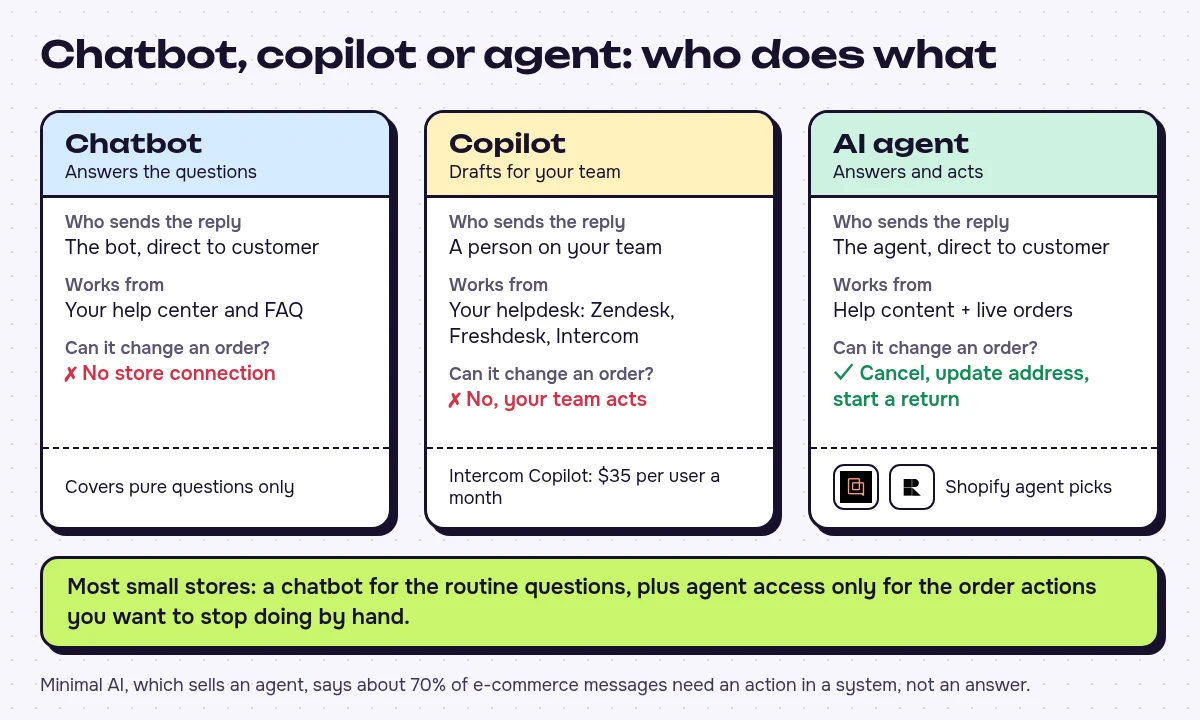
Three kinds of product are sold under the same label. A chatbot answers from your help center and FAQ. A copilot drafts replies for a person on your team to send. Zendesk, Freshdesk and Intercom all sell one, and Intercom's Copilot add-on costs $35 per user a month. An AI agent replies to customers directly and can also read live order data and change things, such as cancelling an order, updating an address or starting a return. Most small stores need a chatbot for the routine questions, plus agent-level access only for the order actions they want to stop doing by hand.
Vendors' automation figures vary, and they are all vendor figures. eDesk states on its product page (July 2026) that its AI Agent resolves up to 65% of tickets on average across its customers, and about 70% of order-status and tracking questions. Builts.ai, which sells AI customer service audits, puts the realistic share at 55-70% for small and mid-size businesses and says vendors claiming 90% or more "are measuring differently than what businesses experience in production." Treat any of these as a ceiling you might reach once the AI is connected to your order data. Without that connection, the AI can only handle the tickets that are pure questions.
Do you need paid AI at all? Use the ticket audit in step 1 to decide. If more than half of your tagged tickets could be answered by pasting a link to a shipping, returns or product page, and you get fewer than about 100 a month, a free tier covers you. eDesk sends stores at 50 to 100 tickets a month to Freshdesk's free plan or Tidio's free tier, and Quickchat AI argues that at 30 conversations a month a $9 plan or a free tier is the right amount to pay. Both companies sell AI support, so their advice to spend little carries some weight. If order lookups and order changes are your biggest tag, budget for a tool that reads live order data, because a better help center won't answer "where is my parcel".
Free options are thinner than the roundups suggest. Only 3 of the 22 customer support tools in our catalogue have a free plan, and two of those, Vapi and Amazon Transcribe, are voice and transcription tools, not chat. The third, Alhena AI, is built for e-commerce, and its free tier covers 25 conversations a month, 500 custom URLs or SKUs and one AI profile. Tidio is listed as trial-only, while eDesk reports a free tier of 50 conversations a month, so see which one Tidio offers when you sign up. Gorgias and Fin offer free trials, and Gorgias Starter at $10 a month gets you a helpdesk without the AI if you want to sort your inbox first. Before paying for anything new, look at what your Shopify plan already includes for customer chat, and whether it can read order status.
| Your situation | Start with |
|---|---|
| Fewer than about 100 tickets a month, mostly where-is-my-order and policy questions | Tidio's free tier or Freshdesk's free plan, the entry tier eDesk suggests (eDesk puts Tidio's fit at under 50 tickets a month) |
| 100 to 300 tickets a month, one or two people answering | Freshdesk Freddy AI Growth, eDesk's pick for this band, or Tidio Starter |
| Shopify store where the AI must cancel, edit or return orders | Gorgias with the AI Agent if you will move your inbox to Gorgias, or Rep AI Support from $49 a month as the cheaper agent-style option |
| Already on a helpdesk and support is mostly chat | Intercom Fin |
| No budget yet | Alhena AI's free tier, or a free trial of the tool you expect to buy |
Steps 1 and 2: audit the inbox, then write the knowledge base before you buy anything
Pull the last 90 days of tickets and tag each one: order status, shipping, returns, sizing or product, damaged goods, payment dispute, other. Count them. Your top five tags are what you automate first.
Then write the answers. An agent repeats only what you give it, and a vague return policy produces vague replies. Builts.ai cites Gartner's 2025 AI Implementation Survey as finding that 62% of underperforming AI support projects fail because of insufficient data preparation rather than the technology. We have that figure only through Builts.ai's summary. Put these in the knowledge base:
- Shipping: carriers, cutoff times, delivery windows per region, what happens when tracking stalls.
- Returns: window in days, who pays postage, refund method, exceptions such as final-sale items.
- Product data: sizing charts, materials, compatibility, care instructions.
- Tone: three sample replies in your voice, including one apology.
- Gaps: every ticket the audit tagged "other" becomes either a new help article or a rule that sends it to a person.
That list is what "training" means for these tools. Most of them learn from your help pages, policy documents and product data, and you don't tune a model. Quickchat AI estimates two to three hours of writing if your website is thin, and close to none if it already answers most questions. The work pays off even if you never switch the AI on.
Step 3: what to automate first and what stays with a person
| Automate first | Keep human |
|---|---|
| Where is my order, with live tracking | Damaged or wrong items |
| Shipping times and cutoffs | Chargebacks and payment disputes |
| Returns and refund policy questions | Angry customers who ask for a person |
| Sizing and product questions | Refunds above a threshold you set |
| Out-of-hours acknowledgement | High-value or repeat customers with a complaint |
Answering a returns question and processing a return are different jobs. Intercom draws the same line: telling a customer "your refund will be processed within 5-7 business days" is retrieval, while pushing the refund through your payment system is resolution. Only the second needs your store connected.
Step 4: what each tool costs, with a worked monthly bill
| Tidio | Gorgias | Intercom Fin | |
|---|---|---|---|
| Entry price | Starter $24.17/mo (annual billing price) | Starter $10/mo helpdesk only, $40/mo with AI Agent | $0.99 per outcome, 50-outcome monthly minimum (about $49.50/mo) |
| Next steps up | Growth from $49.17/mo, Plus from $300/mo plus usage | Basic $90, Pro $550, Advanced $1,430 per month with AI Agent | With Intercom's own helpdesk: $19 per seat per month on top |
| How the AI is billed | Lyro AI conversations sold in bundles on top of the plan, per Minimal's comparison | AI Agent tiers sit on a Gorgias helpdesk plan, and Minimal's comparison describes automated interactions as charged per interaction on top | Per outcome |
| Free route | Free trial; eDesk reports a free tier of 50 conversations a month | Free trial | Free trial |
| Training on your content | Privacy terms don't say | Privacy terms don't say | Yes, opt-out available |
| Compliance listed | SOC 2, HIPAA, GDPR | SOC 2 Type II, HIPAA | SOC 2 Type II, ISO 27001, ISO 27701 |
Gorgias's AI Agent comes with a Gorgias helpdesk plan, so choosing it means moving your inbox to Gorgias. Fin can sit on the helpdesk you already have.
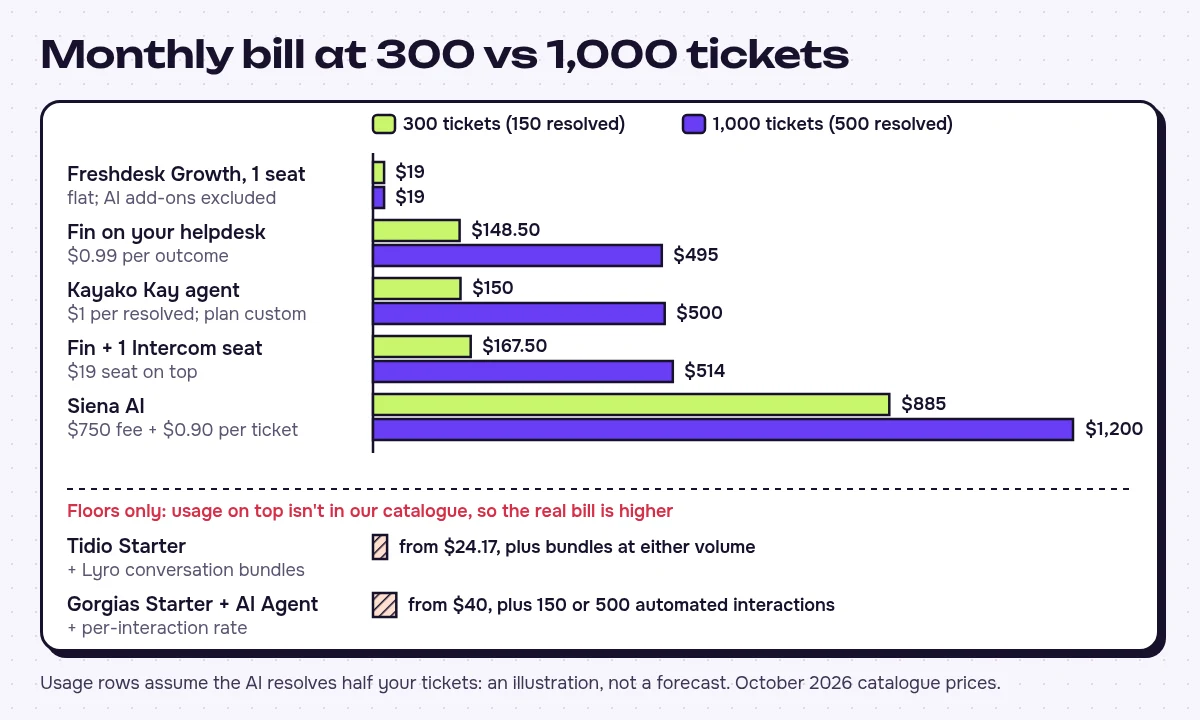
Here is what each pricing model costs at small-store volume. For the usage-priced rows we assume the AI resolves half your tickets. That is our illustration, not a forecast.
| Pricing model | Example | 300 tickets (150 resolved) | 1,000 tickets (500 resolved) |
|---|---|---|---|
| Per outcome | Fin on your current helpdesk, $0.99 per outcome | $148.50 | $495 |
| Per outcome plus seat | Fin on Intercom's helpdesk, one $19 seat | $167.50 | $514 |
| Flat per seat | Freshdesk Growth, $19 per agent a month billed annually (AI add-ons excluded) | $19 for 1 seat, $38 for 2 | $19 for 1 seat, $38 for 2 |
| Helpdesk tier plus per interaction | Gorgias Starter with AI Agent, $40/mo | From $40, plus 150 automated interactions at Gorgias's per-interaction rate | From $40, plus 500 interactions at that rate |
| Plan plus conversation bundles (per conversation) | Tidio Starter, $24.17/mo | From $24.17, plus Lyro bundles | From $24.17, plus more bundles |
The Freshdesk row is a complete bill for the helpdesk seats only: it excludes what Freddy AI's agent features add, so price those separately if you want the AI answering customers. The Gorgias and Tidio rows are floors, so ask each vendor for its per-interaction or bundle rate, and ask Gorgias which tier 1,000 tickets a month needs. To compare either with Fin, get the usage rate, multiply it by your expected automated volume (150 and 500 here) and add the plan price.
What the numbers mean for your decision:
- Per-outcome bills follow your resolution rate and your busy months. At Builts.ai's 55-70% range instead of our 50%, Fin on your current helpdesk costs $163.35 to $207.90 at 300 tickets (165 to 210 outcomes) and $544.50 to $693 at 1,000 tickets. A better-trained bot costs more on this model, and a strong December shows up on the invoice. Intercom argues that per-resolution pricing is fairer, because per-conversation pricing charges you even when the AI fails. Intercom sells per-resolution pricing, so weigh that argument accordingly.
- Flat seat pricing is the only bill that doesn't move with volume. Freshdesk at $19 or $38 a month stays put whether you get 300 tickets or 1,000, which is why it suits a one- or two-person team on a tight budget, as long as you accept that the AI layer is a separate cost.
- Gorgias and Tidio are usage-priced once the AI is on. The tier price is only the starting point. Usage on top grows with volume just as Fin's does, and Fin also needs a helpdesk underneath, so compare full bills, plan plus usage, on both sides.
- Specialist agents start too high for this size. Siena AI charges a $750 platform fee plus $0.90 per automated ticket: $885 at 300 tickets and $1,200 at 1,000 under the same half-resolved assumption. Kayako's Kay agent is $1 per resolved ticket ($150 and $500), but the Kayako One plan is custom-priced. Yuma AI's Starter is $14,400 a year, or $1,200 a month, and Minimal AI starts at 1,000 tickets a month. Rep AI's Support plan starts at $49 a month and is the cheaper agent-style option for Shopify and WooCommerce stores.
Zendesk is the other helpdesk-first route. Zendesk AI prices Support Team per agent per month on annual billing, though Vellum's roundup notes that Zendesk's AI features cost extra on top of the base plan. Shopify Sidekick is an assistant for you as the merchant, for building and running the store, so don't count it as a customer-facing agent.
For the wider cost picture, read AI customer service cost for small business: when it pays off.
Step 5: connect the store and decide what the AI can see
Install the Shopify or WooCommerce integration first. Tidio supports both. Gorgias is built for Shopify and ecommerce brands, and Vellum's roundup reports that Zendesk has an official Shopify app that syncs order and customer data into tickets. Then embed the chat widget on your site, then connect the support email inbox.
Can the AI look up orders and process returns? It depends on the tool. Minimal's comparison lists Tidio Lyro as reading order status through its Shopify app, and Vellum's roundup rates Lyro below Gorgias's AI Agent and Rep AI for complex order actions; neither is a vendor-page source, so test it yourself. Send a test order number through the chat and confirm the agent quotes the live status. If it can't see live order data, you have bought a chatbot.
If the agent needs to trigger work elsewhere, such as a Slack alert for a refund request, Zapier or the open-source Activepieces can connect it without code (our open source Zapier alternatives covers cheaper self-hosted routes).
Step 6: set guardrails and handoff before launch
Write these rules down, then configure them in the tool:
- Refund and discount authority: the AI states policy but does not approve a refund or discount above an amount you set. Zero is a fine start.
- Policy wording: the AI quotes your return and shipping policy as written and does not paraphrase deadlines or exceptions.
- Handoff triggers: any mention of chargeback, lawyer or damaged goods, any frustrated message, any question the knowledge base can't answer.
- Context passing: the human gets the full transcript and order number, so the customer doesn't have to repeat themselves. Builts.ai names escalation with full context as one of three applications that deliver measurable results for small and mid-size businesses.
- A visible way out: customers can type "person" or "agent" at any point and reach the handoff.
- Off-hours: the AI says when a person will reply and names a specific time.
- Disclosure: the bot says it is an AI in its first message.
- Wrong answers: fix the knowledge base within a day of spotting one, and add the question to your test set.
On privacy, check whether the vendor trains on your conversations. Intercom Fin and Yuma AI do unless you opt out, and Tidio's and Gorgias's terms don't say either way. If you sell to EU customers, sign the vendor's data processing terms before launch and say in your privacy policy that an AI handles chat. Our piece on what your AI tools know about you covers retention.
Step 7: soft launch on one channel and read transcripts weekly
Launch on site chat only. First, run 40 to 60 test questions drawn from the audit, including the awkward ones. Quickchat AI warns that on usage-metered plans your own test questions count, and a run that size can use up most of a free tier's monthly allowance, so plan the tests before you start the clock. For the first month, read every escalated conversation and a sample of the ones the AI closed.
Measure resolution, meaning conversations closed with no human involved and no repeat contact. Deflection only counts the customers who stopped asking, and some of them gave up. eDesk's advice fits here: set an internal target from your own ticket mix and check it weekly. The triggers below are our suggested rules for a small team, not industry benchmarks.
| Metric | When to act |
|---|---|
| Wrong answers on policy, refunds or order status in sampled transcripts | One wrong refund or policy promise: send that topic to a human until the knowledge base is fixed. Two or more in a week: roll the AI back to answer-only mode or to drafting replies for you to approve |
| Escalation rate | Rising two weeks in a row: stop adding topics and fix the gaps the escalations reveal |
| CSAT on AI-handled chats | Below your human-handled chats for two weeks running: narrow the AI to your top two tags |
| Resolution rate | Flat after four weeks: fix the knowledge base before adding email or changing platforms; compare it with the vendor's claim only after a month |
Pre-launch checklist and a 30-day rollout
Before go-live, confirm you have:
- Shipping, returns and product pages that match what the AI will say
- Three sample replies that set the tone
- Every Step 6 rule configured in the tool and triggered once in testing
- 40 to 60 test questions answered correctly, including live order lookups
Then roll out over four weeks:
- Week 1: audit tickets, write the missing help articles, set the refund cap.
- Week 2: connect the store, run the test questions, fix wrong answers.
- Week 3: go live on site chat with handoff on, and read every escalation.
- Week 4: review the metrics above, and add email only if chat holds up.
Will AI replace customer service for a small store?
No. Builts.ai estimates that 30-45% of support volume still needs human judgment: complaints, policy exceptions, emotionally complex situations and questions nobody has asked before. At small-store size, the AI takes the repeated questions and you keep the damaged parcels, the disputes and the upset regulars. The main failure modes are confident answers drawn from stale policy pages and promises of refunds you never authorised. The refund cap, the handoff rules and the weekly transcript reading are there to catch them.










Written by
Stanislav Vovchyk
Founder and editor of infobro.ai
I run infobro.ai: I decide what it covers and how tools are evaluated.
I research every tool from its documentation, pricing pages, product screenshots and public developer discussion, and say plainly what the evidence does and does not show.
More guides
Guide
What Is MCP? How ChatGPT and Claude Connect to Your Apps, and What Can Go Wrong
Nov 3, 2026 · 10 min read