Best of
Top 9 AI Tools for Marketing Teams in 2026: Ranked by Real Output Quality
May 31, 2026 · 14 min read

Schedule, publish and analyze social posts across 12 platforms with per-channel pricing
Own Buffer? Claim it, free to correct the facts and get the verified badge.
Pricing
Free · from $5/mo
Free trial
Yes
API
Yes
Platforms
Buffer is a mature, plain scheduler that covers 12 platforms and gives every plan API access, with unlimited seats on Team. As of October 2026, channels cost $5/mo (Essentials) or $10/mo (Team) billed yearly, which is fair for a handful of accounts and costly for agencies. Analytics stay light and approvals sit behind the Team price, so teams needing deep reporting will outgrow it.
Best for: Solo creators and small businesses who want reliable, low-friction social media scheduling
Read the full reviewBuffer is a social media management workspace for planning, scheduling and analyzing posts on Instagram, Facebook, TikTok, LinkedIn, X, YouTube, Threads, Pinterest, Google Business Profile, Bluesky, Mastodon and Substack. Users collect content ideas, draft posts with an AI Assistant, and queue them on a visual calendar.
It also has a community inbox where you can reply to comments across channels, plus analytics with reports and takeaways, team approval workflows, and a link-in-bio Start Page. You can connect Buffer to Claude or ChatGPT through MCP and an API, so an AI assistant can pull performance data and send drafts to your queue.
Buffer suits solo creators, small businesses, agencies, nonprofits and universities. You pay per connected channel. A free plan covers up to 3 channels, and paid plans start at $5 per channel per month.
Who it's for
Queue one idea as platform-specific posts across Instagram, TikTok, Threads and more from a single dashboard.
Per-channel pricing lets agencies add or remove client channels as contracts change, and the Team plan adds approvals and branded reports.
Reply to comments from all channels in one inbox and see which posts perform best.
Connect Buffer to Claude or ChatGPT to ask about top posts and send new drafts straight to the queue.
From the vendor's site, checked Oct 26, 2026; we re-check prices monthly. Prices change — confirm on their pricing page.
Free
forever
Free
Essentials
month
$5/mo per channel ($60 billed yearly)
Team
month
$10/mo per channel ($120 billed yearly)
What the free plan gets you
Which plan do you need?
The cheapest paid plan with a published price that fits. Custom and sales-quoted plans aren't included.
| Tool | Starts at | Free plan | Free trial | API | Open source | |
|---|---|---|---|---|---|---|
| BBuffer | $5/mo | — | ||||
Z Zapier | $19.99/mo | — | Buffer vs Zapier | |||
N n8n | — | — | — | Buffer vs n8n | ||
M Make | $9/mo | — | — | Buffer vs Make | ||
M Microsoft Power Automate | $15/mo | — | — | — | Buffer vs Microsoft Power Automate |
The closest alternatives in our directory by category. “Starts at” is the cheapest paid plan per month, as each vendor lists it.
“Joel Gascoigne CEO & Co-Founder Chicago, USA”
From Buffer's own about, terms and privacy pages, checked Oct 28, 2026.
19 changelog entries since Apr 2026, latest Oct 14, 2026. Changelog
Strengths
Limitations
 Stanislav VovchykUpdated Oct 28, 202612 min read
Updated October 2026
Buffer bills per channel, not per person, and that one choice decides most of the buying case. On Team, a channel costs $10/mo billed yearly and covers unlimited team members, so a ten-person group pays the same as a freelancer with the same accounts. API access sits on every plan, free included. Around that sits a plain scheduler with light analytics. The open dashboard shows 311,845 monthly active users, 84,802 customers, 73 teammates and $27.8M in annual recurring revenue, and the changelog logged eight entries in the 90 days to mid-October 2026. This product is still being worked on.
You connect your accounts, write a post in the composer, pick the channels, then either drop it into a queue or set an exact time. The queue suits batch workers. You define posting slots for each weekday, write a week of content in one sitting, and Buffer fills the slots in order.
Cross-posting is where the composer earns its place. You write a base post, then adjust it per platform: a shorter caption for one network, different hashtags for another, a different image. A LinkedIn post and an Instagram caption are different things, and you don't need separate drafts to treat them that way. Threads publish natively to X, Bluesky, Threads and Mastodon from the same composer, which matters if long threaded posts are part of how you distribute.
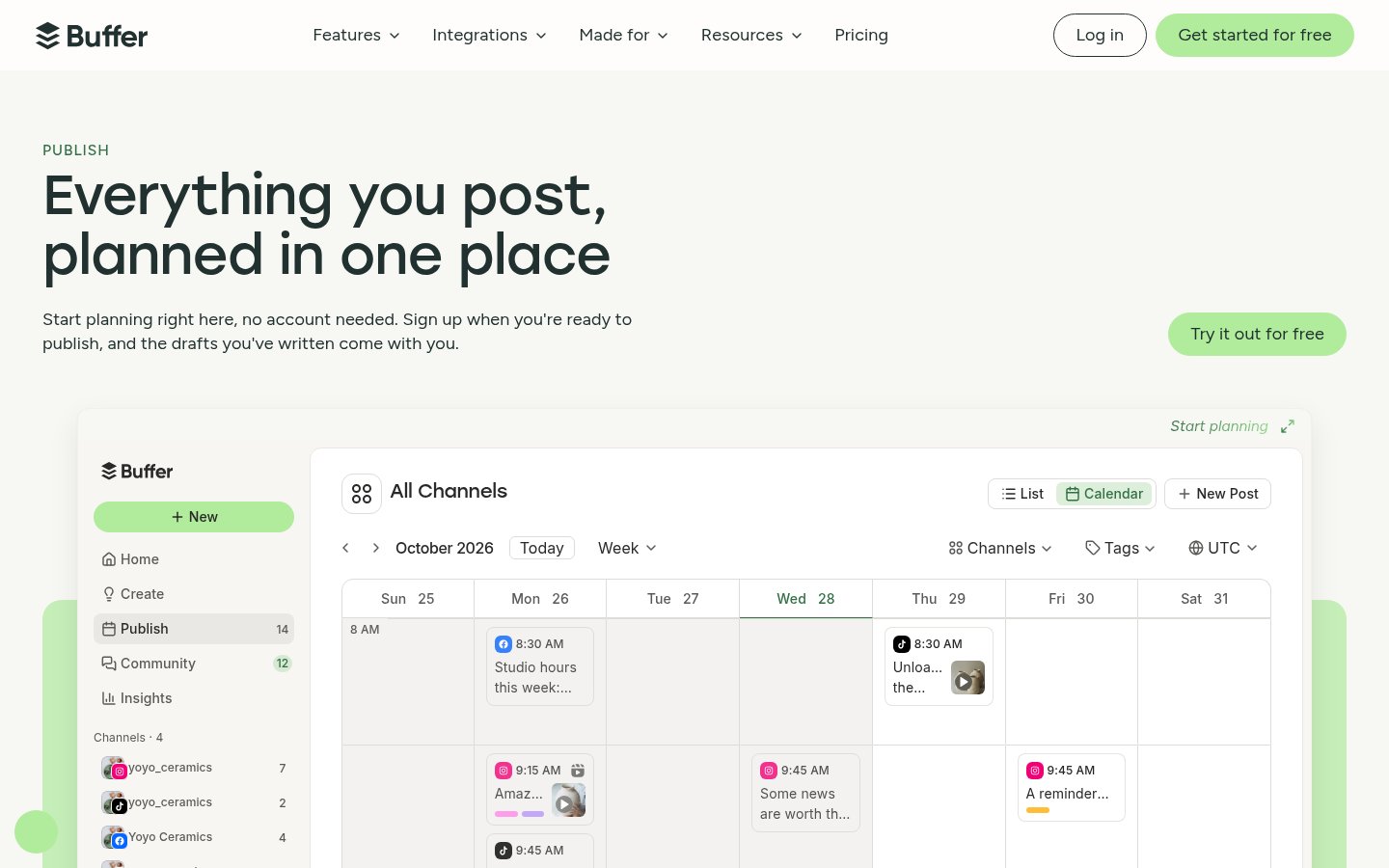
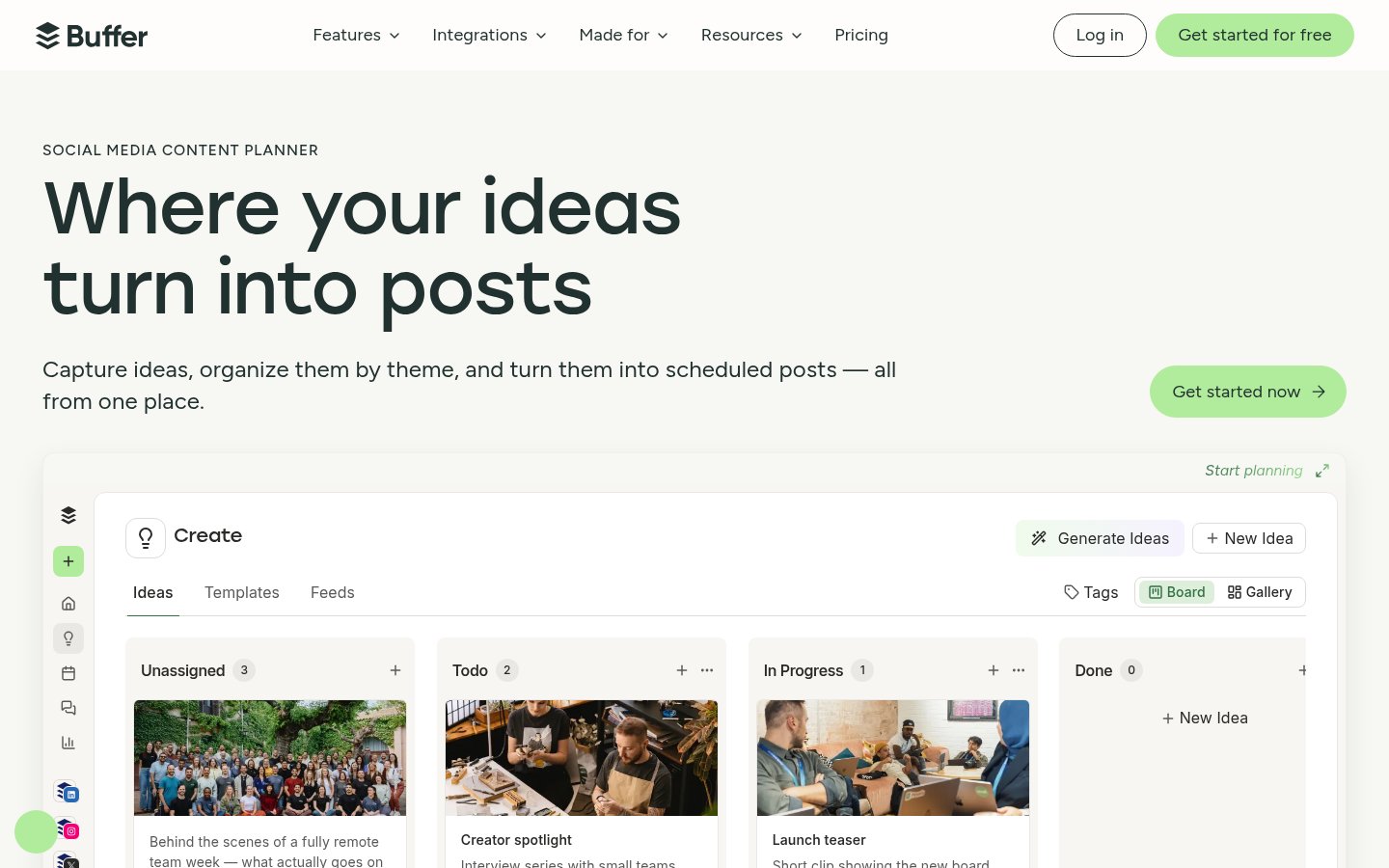
Planning sits next to publishing. There's a visual content calendar, an Ideas board for capturing material before it becomes a post, and tags to group content by campaign. The AI Assistant does three jobs: it brainstorms ideas, rewrites existing copy, and drafts platform-specific versions of a post. That's a drafting aid, not an autopilot. It's listed on every plan, free included, and the pricing page states no usage cap for it. Most rivals gate AI behind paid tiers, so that's more generous than usual.
The community inbox, also on every plan, lets you triage and reply to comments across channels from one screen. It handles a modest comment volume. If replies are your main job, it's a bonus rather than the reason to buy.
Platform coverage. Buffer schedules to 12 platforms: Facebook, Instagram, TikTok, LinkedIn, Threads, Bluesky, YouTube Shorts, Pinterest, Google Business Profile, Mastodon, X and Substack. Substack is the useful newcomer. A newsletter writer can queue promotion for each issue alongside everything else instead of juggling a second tool. Bluesky and Mastodon are rarely supported this cleanly at this price. YouTube Shorts matters because short-form video scheduling is where many schedulers still fall short, and if you're producing that video with AI, this small-business guide to AI video covers the production side.
API and MCP access on every plan. This is what separates Buffer from the pack right now. The pricing page lists 1 API key on Free, 3 on Essentials and 5 on Team. Request limits scale with channel count and then hit a ceiling, as of October 2026: 1,000 requests per channel a month on Free (up to 3,000), 3,000 on Essentials (up to 30,000) and 10,000 on Team (up to 100,000). The homepage also pitches an MCP connection to Claude or ChatGPT. You ask which posts did best this month, the assistant pulls the numbers from Buffer, and content you plan lands in your queue. That pitch is the vendor's own, but a free plan with API access is a bold move. If you'd rather wire Buffer into other tools yourself, open-source Zapier alternatives are the natural companion. Buffer's first Build Contest runs October 28 to November 13, which says it wants developers building on this.
The free plan is tight, especially for video-first accounts. You get up to 3 channels in total, 10 scheduled posts per channel, 100 ideas, one user and a 30-day insights history. If TikTok and Instagram are your two main accounts, they use two of your three slots, and each can hold only 10 queued posts, which refill as posts publish. A daily poster on each has queued ten days ahead at best, so batching a month in one sitting isn't possible on Free. The 30-day history also means you can't compare this quarter with last year without paying.
Collaboration has a hard edge. Essentials is a strict one-user plan. Approval workflows, access levels and branded reports all sit on Team, which costs double per channel. If one editor drafts and a director signs off, you pay the Team rate on every channel to get that, not just the one that needs sign-off.
Analytics are readable but light. The public pages describe basic and advanced analytics and reports. Social listening, competitor benchmarking and sentiment tracking never appear. Nor does any volume discount for high channel counts, which is telling for anyone running many accounts. If you need reporting that anchors a client retainer, Hootsuite is the usual step up.
Public reviews agree. Buffer scores 3.6 out of 5 on TrustRadius, with users praising simplicity and ease of use. The recurring complaints are missing depth and advanced features, slow image uploads, no Instagram grid preview and thin caption management. Instagram-first users should weigh that last group before committing. Buffer sells clarity, not depth.
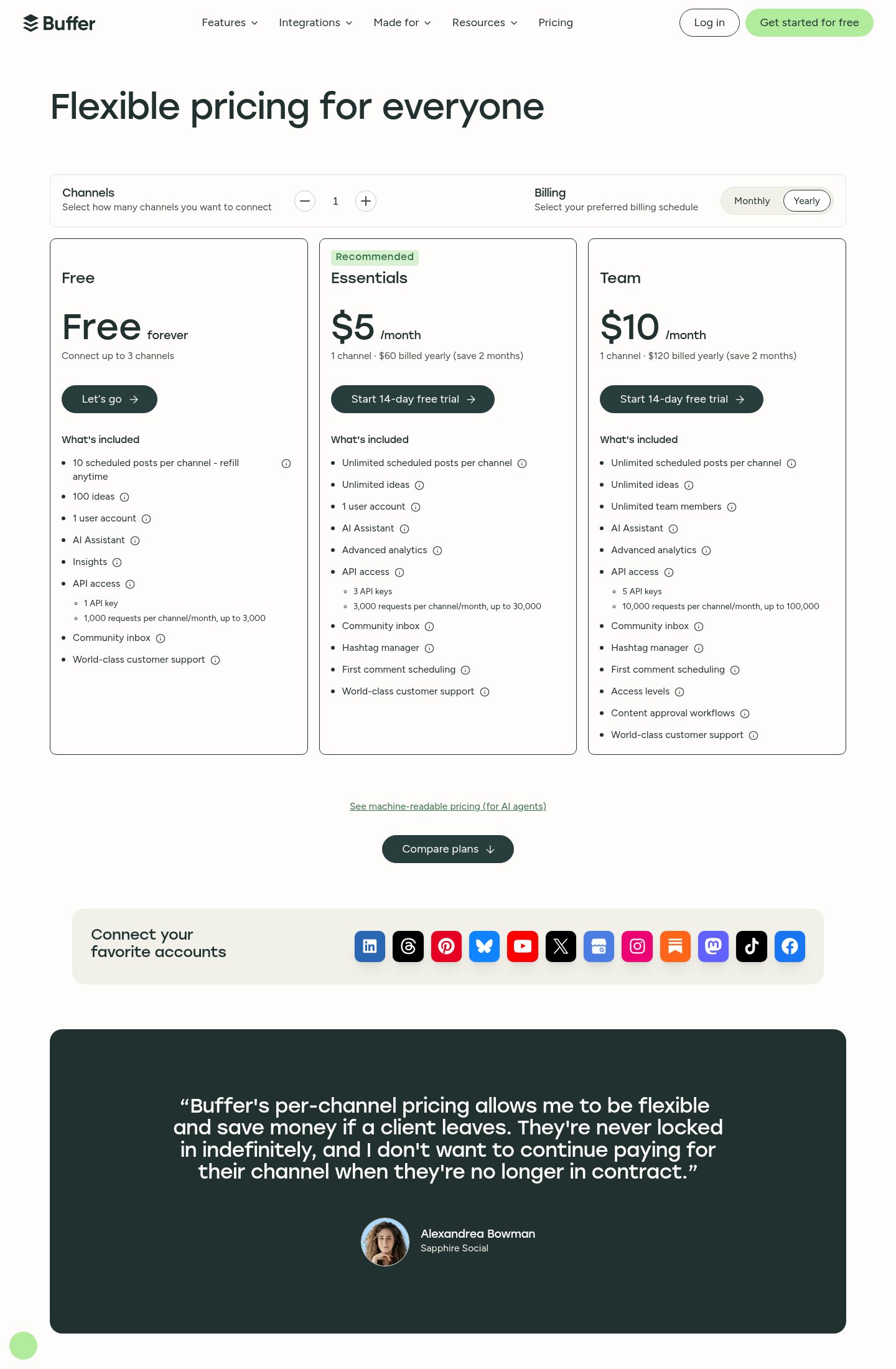
As of October 2026, Essentials is $5/mo per channel ($60 billed yearly) and Team is $10/mo per channel ($120 billed yearly). The page says yearly billing saves two months. Headcount never changes the bill, only channels do. A creator with three channels on Essentials pays $15/mo. A five-channel business pays $25 on Essentials, or $50 on Team if it needs approvals, and that Team price holds whether five people or twenty use it. That's the structural advantage over per-seat tools. An agency owner quoted on the pricing page makes the other half of the case: with per-channel pricing you drop a channel when a client leaves, so you're never locked in.
It turns against you at scale. Fifteen channels on Team is $150/mo, and every client you add raises the bill with no volume break shown. For a lean team that needs approvals, Team is fair. For a solo operator, Essentials is the sweet spot: unlimited posts and ideas, advanced analytics, a hashtag manager and first comment scheduling. Start on Free, but expect to outgrow the 10-post cap fast if you post daily.
Pick Buffer if you're a solo creator, a newsletter writer or a small business with a handful of channels and you want scheduling that stays out of the way. It also fits small teams that need approvals without paying per seat, and developers or AI-minded marketers who want API and MCP access without an enterprise contract. The interface is plain and the free tier is usable.
Skip it if you run a large agency with many client accounts, need deep reporting or social listening, or expect heavy comment volume in the inbox. The per-channel model gets expensive past a dozen accounts, and the analytics won't anchor a retainer. Teams that need approvals on only some channels will also feel the jump to Team pricing on every channel. Instagram-first users who care about grid previews should look at Later instead.
Check the API request limits against your channel count before you build anything. They're set per channel and capped, so a three-channel Free account tops out at 3,000 requests a month. The 14-day trials on Essentials and Team let you try paid features before you commit, and it's worth testing approvals on a real workflow during the Team trial. Support is human and spread across time zones, with a Discord community, and Buffer says you could end up talking with anyone from a marketer to an engineer.
Yes. The free plan covers up to 3 channels, 10 scheduled posts per channel, 1 user and 3,000 API requests a month.
Essentials is $5/month per channel and Team is $10/month per channel, shown as yearly billing ($60 and $120 a year). Both come with a 14-day free trial.
Instagram, Facebook, TikTok, LinkedIn, X, YouTube, Threads, Pinterest, Google Business Profile, Bluesky, Mastodon and Substack.
Yes. Buffer has iOS and Android apps and a browser extension.
Yes. Buffer offers an API and MCP connection for Claude or ChatGPT, so an assistant can pull your analytics and add posts to your queue.
No reviews yet. Used Buffer? Be the first.
Sign in to rate this tool and share how you use it.
Best of
May 31, 2026 · 14 min read
Best of
May 24, 2026 · 15 min read
Best of
May 4, 2026 · 17 min read
Best of
May 4, 2026 · 16 min read
Best of
May 4, 2026 · 15 min read
Buffer
Free · from $5/mo